

Introduction to On-Page SEO
Importance of On-Page SEO
On-Page SEO plays a pivotal role in ensuring that websites are optimized for search engines. It’s where the magic of visibility happens. Without effective On-Page SEO, even the best content can get lost in the vast digital ocean.
For instance, consider a blog about gardening tips. If it lacks appropriate keywords, headings, or meta tags, potential readers might never find it through search queries. Investing time in On-Page SEO can lead to increased traffic, improved ranking, and ultimately, more conversions.
Basics of Website Optimization
To effectively optimize a website, several key elements must be addressed:
- Keyword Integration : Seamlessly weave relevant keywords into the content.
- Content Quality : Ensure content is informative and engaging.
- User Experience : Prioritize intuitive navigation and fast loading times.
Grasping these basics sets the foundation for building a successful online presence.
Keyword Research and Analysis
Identifying Target Keywords
Once the basics of On-Page SEO are established, the next key step is identifying target keywords. This is akin to finding the right tools for a gardening project. Just as each plant has its specific needs, each topic requires relevant keywords to thrive.
To begin, consider:
- Brainstorming : List down potential topics related to your niche.
- Competitor Analysis : Check what keywords similar sites are targeting.
- Keyword Tools : Utilize tools like Google Keyword Planner or Ahrefs to discover search volumes and competition levels.
Using Long-Tail Keywords Effectively
Long-tail keywords can be game-changers. These phrases, typically longer and more specific, often have lower competition and higher conversion rates. For example, instead of targeting “shoes,” consider “best running shoes for flat feet.”
Benefits of using long-tail keywords:
- Higher search intent : They attract users closer to making a decision.
- Less competition : Easier to rank for, especially for newer websites.
Employing both target and long-tail keywords can significantly enhance your site’s visibility and drive traffic.

Content Optimization
Creating High-Quality Content
As we move deeper into keyword research and analysis, the next crucial step is content optimization, where quality reigns supreme. High-quality content not only engages readers but also fosters trust and authority.
A great way to ensure your content shines is to:
- Provide Value : Answer questions that your audience is asking.
- Engage with Visuals : Incorporate images, infographics, and videos to break up text and enhance understanding.
- Stay Authentic : Share personal anecdotes or examples to create a rapport with readers.
Implementing Proper Heading Tags
Properly using heading tags (H1, H2, H3, etc.) is vital for both SEO and user experience. Think of them as signposts guiding your readers through the content.
Here’s how to optimize your headings:
- H1 for Titles : Use it for the main title only.
- H2 for Main Points : Break content into sections for better readability.
- H3 for Subpoints : Further detail under each main point.
By focusing on these strategies, content can reach its full potential and resonate with both search engines and users alike.
Meta Tags and Descriptions
Writing Compelling Meta Titles
After mastering content optimization, the next critical area is the use of meta tags and descriptions. Meta titles are essentially the first impression the audience gets in search results. Think of them as the storefront of your content!
To craft compelling meta titles, consider:
- Keeping it Concise : Aim for 50-60 characters to ensure visibility.
- Incorporating Keywords : Use target keywords naturally, helping both search engines and readers recognize relevance.
- Creating Urgency : Phrasing like “Limited Time Offer” can encourage clicks.
Crafting Engaging Meta Descriptions
Moving on to meta descriptions, these serve as a brief summary of your content in search results. An engaging description can significantly boost your click-through rate.
Here are some tips for crafting effective meta descriptions:
- Be Descriptive : Use 150-160 characters to highlight the page’s value.
- Include a Call-to-Action : Phrases like “Learn more” or “Discover” can prompt users to click.
- Highlight Unique Features : What sets your content apart?
By optimizing both meta titles and descriptions, the visibility and attractiveness of your content can be significantly enhanced.

Image Optimization
Optimizing Image Alt Text
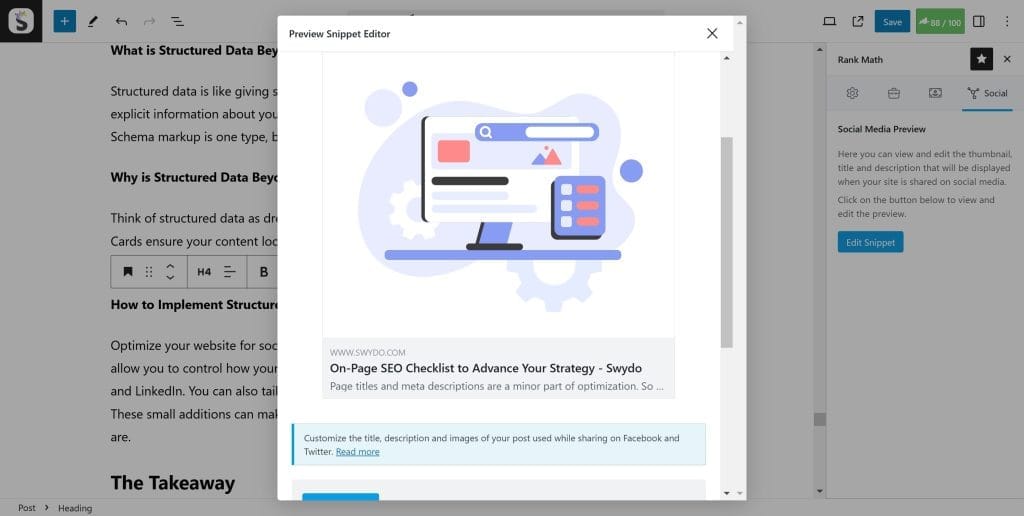
As we delve into image optimization, it’s essential to understand that images are not just visual elements; they play a crucial role in SEO too. An often-overlooked aspect is alt text, which describes images to search engines and users.
To optimize image alt text effectively:
- Be Descriptive : Clearly describe what the image depicts to give context.
- Incorporate Keywords : Use relevant keywords where appropriate, but keep it natural.
- Keep it Concise : Aim for 125 characters or fewer, as this length is easily digestible.
Compressing Image Files for Better Loading Speed
Next, let’s talk about compressing image files. Large images can slow down your website, leading to a frustrating user experience.
To ensure faster loading times:
- Use Tools : Utilize tools like TinyPNG or ImageOptim to reduce file size without sacrificing quality.
- Choose the Right Format : JPEGs are best for photos, while PNGs work well for graphics with fewer colors.
By optimizing both alt text and file compression, your images will not only enhance user experience but also contribute positively to your site’s search engine ranking.
Internal Linking Strategies
Utilizing Anchor Texts
With image optimization tackled, it’s time to focus on internal linking strategies. Internal links help guide your audience through your website while also enhancing SEO. An effective starting point is the use of anchor texts. These clickable phrases should entice users and give them an idea of what to expect.
For optimal results:
- Descriptive Phrasing : Use clear, relevant phrases instead of generic terms like “click here.”
- Incorporate Keywords : Strategically place keywords within the anchor text to boost relevance for search engines.
- Ensure Context : The link should seamlessly fit within the content, enhancing comprehension and engagement.
Creating a Hierarchical Structure for Internal Links
Next, establishing a hierarchical structure for internal links is vital. This structure helps search engines understand the relationship between your pages and their importance.
Consider these tips:
- Use a Pyramid Approach : Place your most important pages at the top and link to related pages beneath them.
- Limit Depth : Ensure users can navigate to any page within three clicks for maximum accessibility.
By employing effective anchor texts and a clear linking hierarchy, you can improve both user experience and SEO performance on your site.
Mobile-Friendliness
Responsive Design
Following internal linking strategies, the next essential aspect of On-Page SEO is ensuring mobile-friendliness. With a growing number of users accessing websites via mobile devices, having a responsive design is crucial. A responsive design automatically adjusts to different screen sizes, providing an optimal viewing experience.
To implement responsive design effectively:
- Fluid Grids : Use percentages for layout elements to scale appropriately on any device.
- Flexible Images : Ensure images adjust to fit within their containers without quality loss.
- Test Across Devices : Regularly verify that your site looks good and functions well on various smartphones and tablets.
Accelerated Mobile Pages (AMP)
Another powerful tool to enhance mobile-friendliness is Accelerated Mobile Pages (AMP). AMP is designed to decrease the loading time of mobile web pages significantly, ensuring a smoother experience for users.
Key benefits of implementing AMP:
- Faster Load Times : Pages load almost instantly, reducing bounce rates.
- Improved Visibility : AMP content may receive prioritize rankings on search engine results pages.
By focusing on responsive design and adopting AMP, websites can significantly enhance user experience for mobile visitors, ultimately improving engagement and retention.
Page Speed Optimization
Minifying CSS and JavaScript
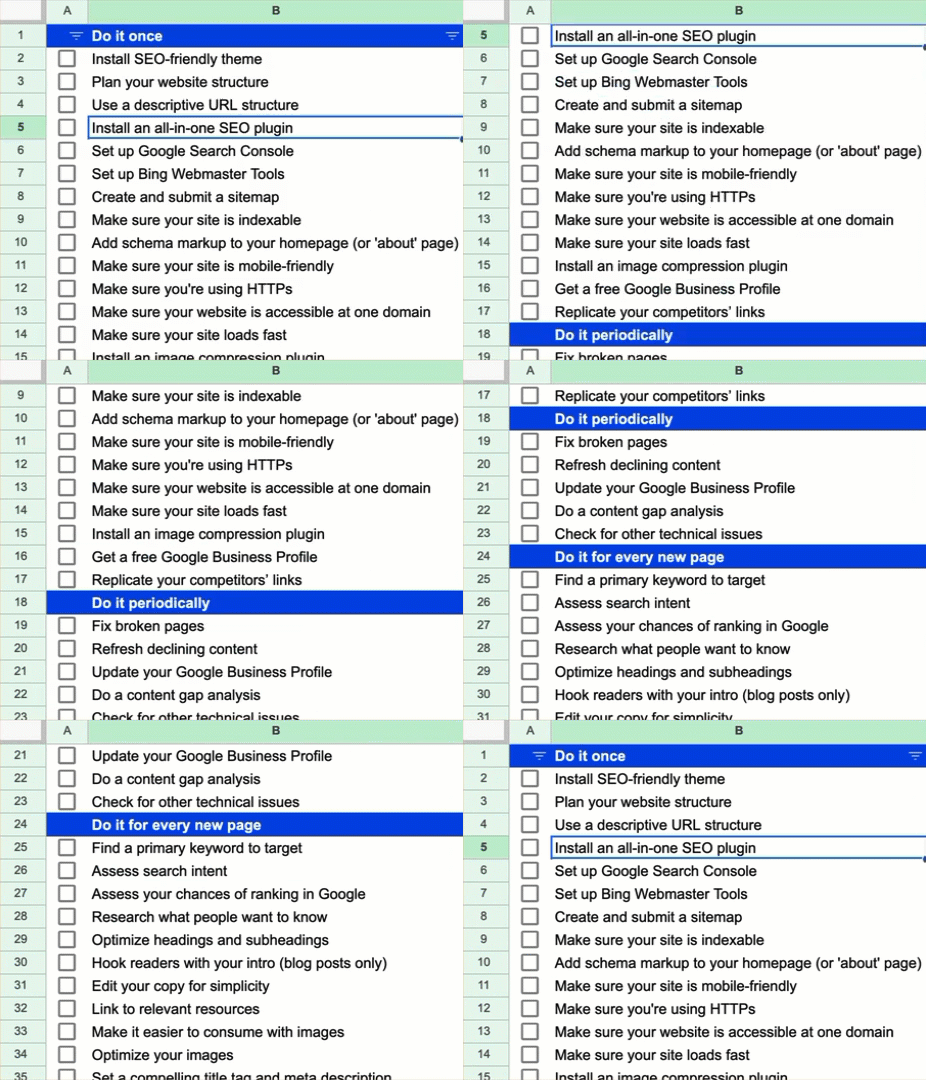
Building on mobile-friendliness, another critical aspect of On-Page SEO is page speed optimization. A fast-loading website provides a positive user experience and can boost your SEO ranking. One effective way to increase speed is by minifying CSS and JavaScript files. This process involves removing unnecessary characters, such as spaces and comments, from your code.
To get started with minification, consider:
- Using Tools : Tools like UglifyJS for JavaScript or CSSNano for CSS can automate the process.
- Updating Regularly : Remember to minify new files whenever changes are made to maintain speed.
Leveraging Browser Caching
Another vital method for optimizing page speed is leveraging browser caching. By instructing browsers to store certain website elements locally, you reduce load times for returning visitors.
Here’s how to effectively leverage browser caching:
- Set Expiration Times : Define how long files should be stored, so they don’t need to be downloaded afresh on each visit.
- Use Compression : Enable Gzip compression on your server to further decrease file sizes.
By combining these strategies of minifying files and leveraging browser caching, you’re well on your way to a faster and more efficient website.
URL Structure
Creating SEO-Friendly URLs
Transitioning from page speed optimization, let’s now focus on URL structure, a fundamental but often overlooked aspect of On-Page SEO. Creating SEO-friendly URLs enhances both user experience and search engine visibility. An ideal URL is concise, descriptive, and easy to read.
Here are a few tips for crafting effective URLs:
- Keep it Simple : Aim for clarity and brevity; avoid lengthy strings of numbers or special characters.
- Use Hyphens : Separate words with hyphens for better readability (e.g., /best-gardening-tools/ instead of /bestgardeningtools/).
- Limit Parameters : Reducing the number of query parameters can make your URLs cleaner.
Including Keywords in URLs
Another significant aspect of URL structure is the inclusion of relevant keywords. Keywords in URLs provide context not only for search engines but also for users.
Ensure you:
- Place Important Keywords Early : Position primary keywords closer to the beginning of the URL for enhanced SEO value.
- Match Content : Ensure the URL reflects the content of the page accurately.
By focusing on creating SEO-friendly URLs and incorporating relevant keywords, you can effectively enhance your site’s searchability and user experience.
Schema Markup
Enhancing Search Engine Snippets
Following the importance of URL structure, incorporating schema markup into your site can significantly boost your visibility in search results. Schema markup is a type of code that you add to your website to help search engines understand your content better. This leads to enhanced search engine snippets that can attract more clicks.
To effectively enhance your snippets:
- Use Proper Schema Types : Implement schema for articles, products, events, and reviews, as applicable.
- Preview Changes : Tools like Google’s Rich Results Test allow you to see how your markup will look in search results.
Structured Data for Rich Results
Harnessing structured data also enables you to achieve rich results, such as star ratings, images, and additional information directly in search results.
Key advantages include:
- Increased Visibility : Rich results stand out on the search engine results page, garnering more attention.
- Higher CTR : Enhanced snippets often lead to improved click-through rates.
By effectively implementing schema markup and structured data, your website can rise above the competition and captivate your audience in the digital landscape.
Webmaster Tools Setup
Submitting XML Sitemap
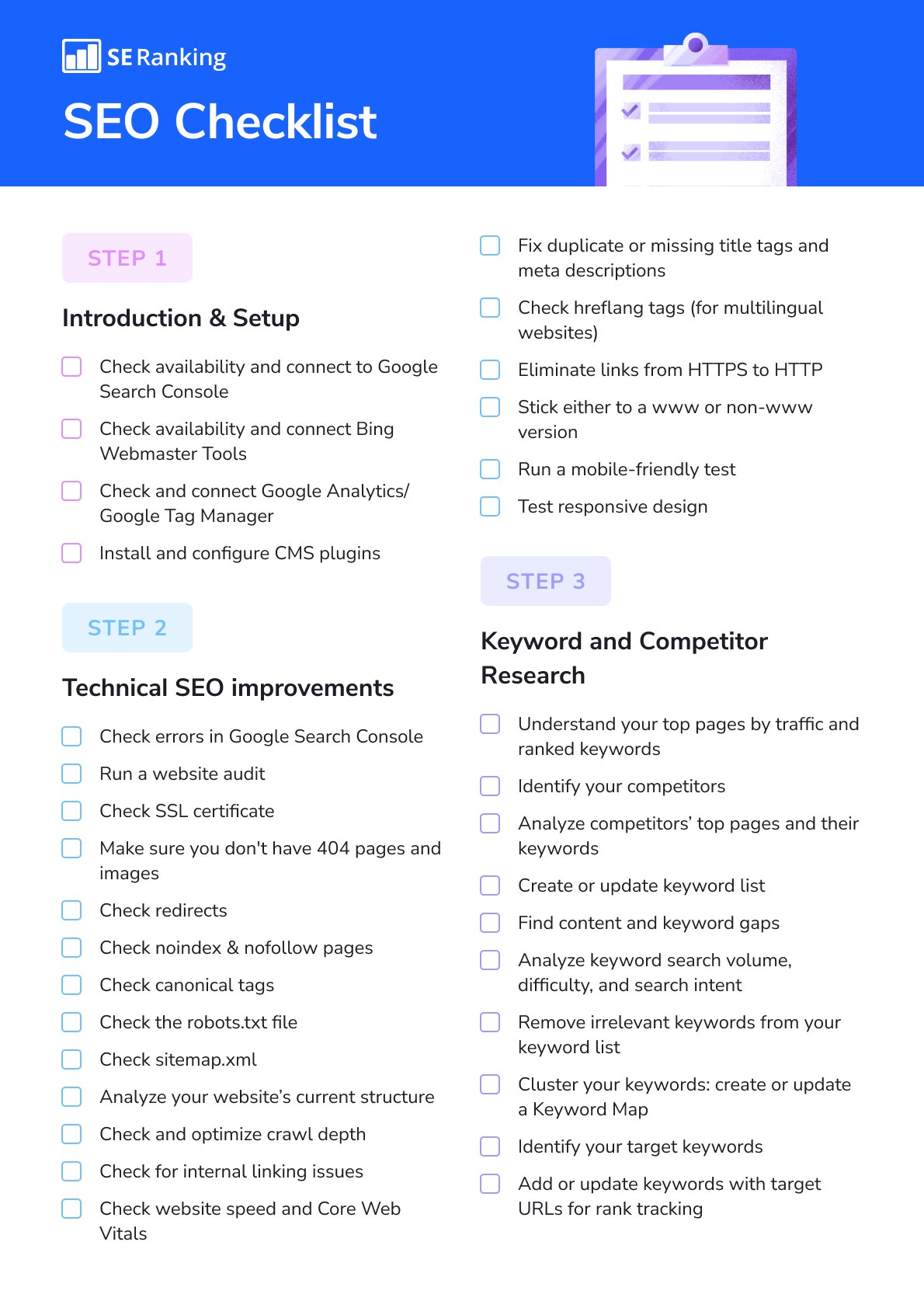
Building on schema markup, setting up webmaster tools is crucial for tracking your site’s success. One of the first steps is submitting your XML sitemap. An XML sitemap acts as a roadmap for search engines, guiding them to all the important pages on your website.
To ensure your sitemap is effective:
- Generate Your Sitemap : Use tools like Yoast SEO or Google’s XML Sitemaps to create a clean, organized sitemap.
- Submit to Search Engines : Once complete, submit it via Google Search Console and Bing Webmaster Tools for quicker indexing.
Monitoring Website Performance on Search Engines
Once your sitemap is submitted, monitoring your website’s performance is essential. This allows you to identify any issues and track your SEO success.
Consider these monitoring strategies:
- Look at Indexing Status : Regularly check how many of your pages are indexed.
- Analyze Search Traffic : Use Google Analytics to monitor traffic sources and user behavior.
By focusing on submitting an XML sitemap and continuously monitoring performance, you can ensure better visibility and success in the competitive online landscape.
User Experience Optimization
Improving Readability
Following the essential steps for webmaster tools setup, user experience optimization is a critical factor in maintaining site engagement and visitor satisfaction. One of the first areas to address is readability. If your content is difficult to read, no one will stay to enjoy it!
To improve readability:
- Use Short Paragraphs : Aim for 2-3 sentences per paragraph to keep the content digestible.
- Select Readable Fonts : Choose clear, legible fonts with proper sizing.
- Incorporate Headings and Lists : Break content into sections with headings and use bullet points to highlight key information.
Ensuring Clear Call-to-Actions
Along with improving readability, ensure that your calls-to-action (CTAs) are clear and compelling. CTAs guide users on what to do next, whether signing up for a newsletter or exploring your services.
To optimize your CTAs:
- Use Action-Oriented Language : Phrases like “Join Now” or “Get Your Free Trial” create urgency.
- Position Strategically : Place CTAs in locations where they naturally fit within the content flow.
By enhancing readability and ensuring clear CTAs, you can create a seamless user experience that keeps visitors engaged and encourages conversions.

Social Media Integration
Sharing Optimized Content
As we continue our journey in optimizing user experience, integrating social media into your SEO strategy becomes vital. Social media platforms are fantastic channels for sharing your optimized content, providing an opportunity to reach a larger audience.
To effectively share content:
- Utilize Eye-Catching Graphics : Create visually engaging images that encapsulate your content, making it more shareable.
- Post at Peak Times : Research when your target audience is most active on social platforms to maximize visibility.
- Include Social Sharing Buttons : Add buttons to your blog posts, so readers can quickly share content with their networks.
Encouraging Social Signals
Encouraging social signals—likes, shares, and comments—on your posts can also boost your website’s credibility.
Consider these strategies:
- Engagement Campaigns : Run contests or ask questions to encourage interaction with your content.
- Respond to Comments : Engage with your audience to foster a sense of community and increase loyalty.
By sharing optimized content and encouraging social signals, you can greatly enhance your online presence and drive more traffic to your website.
On-Page SEO Audit
Conducting Regular Website Audits
As we wrap up the discussion on social media integration, it’s essential to highlight the importance of conducting regular on-page SEO audits. These audits are crucial for identifying what’s working and what needs improvement on your website.
To conduct an effective audit:
- Use SEO Tools : Leverage tools like SEMrush or Ahrefs to analyze your site’s performance and get insights on keyword usage.
- Review Performance Metrics : Check analytics data to understand user behavior, bounce rates, and traffic sources.
- Check Mobile-Friendliness : Ensure your site functions smoothly on mobile devices, as this is often where traffic originates.
Fixing Errors and Issues
Once you identify issues within your audit, the next step is to fix them promptly.
Here’s how to address common problems:
- Repair Broken Links : Use tools like Screaming Frog to find and rectify any broken outgoing or internal links.
- Optimize Load Time : If pages are slow to load, consider compressing images or utilizing browser caching.
- Update Meta Tags : Refresh old meta tags with relevant keywords for better visibility.
By conducting regular audits and addressing errors, you can ensure that your website remains optimized for search engines and users alike.
Conclusion and Next Steps
Recap of On-Page SEO Checklist
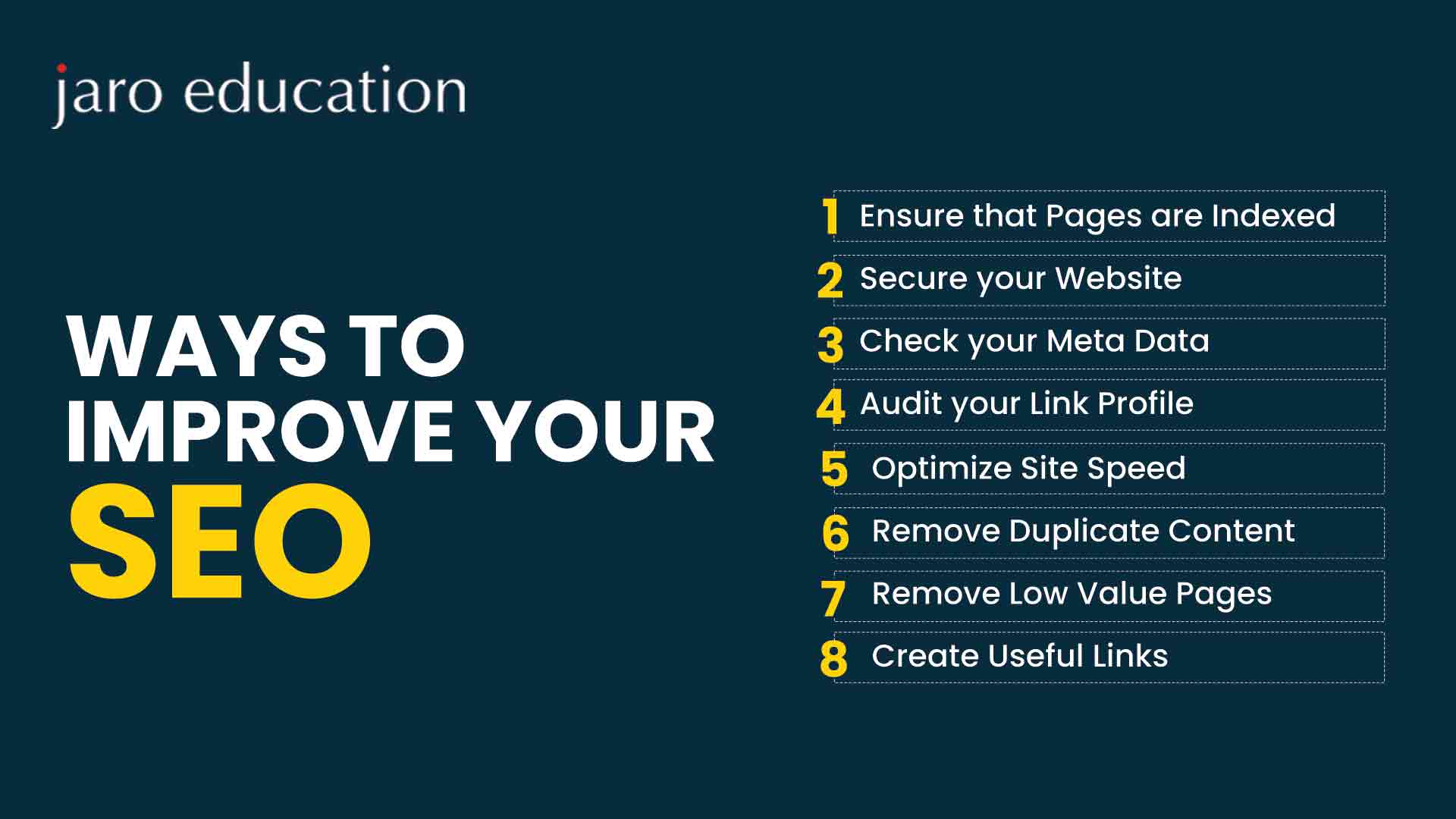
As we conclude our exploration of On-Page SEO, it’s time to recap some essential elements to keep your website thriving. By following a comprehensive checklist, you can ensure your site remains competitive in search rankings.
Consider these key areas:
- Content Quality : Always prioritize creating high-quality, engaging content.
- Meta Tags : Optimize your meta titles and descriptions for search visibility.
- Internal and External Links : Use effective linking strategies to enhance navigation and authority.
- Mobile Optimization : Ensure a seamless experience for mobile users.
Strategies for Continuous Website Optimization
Looking ahead, website optimization should be an ongoing process. Here are some strategies to maintain momentum:
- Stay Updated on SEO Trends : Regularly read industry blogs and attend webinars.
- Analyze Performance : Continuously monitor your website’s metrics for insights on user behavior.
- Iterate and Experiment : Don’t hesitate to test new strategies and make adjustments based on results.
By consistently applying these practices, you can position your website for long-term success and visibility in an ever-evolving digital landscape.