
Introduction
In the ever-evolving landscape of digital marketing, Search Engine Optimization (SEO) remains a crucial aspect of any online strategy. With millions of websites vying for users’ attention, mastering SEO tools can empower businesses to enhance their visibility and drive traffic effectively. Whether one is a seasoned marketer or just starting out, the right set of tools can make all the difference.
The Importance of SEO Tools
Imagine launching a website without any SEO strategies in place—it’s comparable to opening a store in a remote location with no signs directing customers. To thrive online, one must leverage various tools designed to optimize every facet of the SEO process.
- Keyword Research: Identifying the right keywords can significantly enhance content strategy.
- On-Page Optimization: Fine-tuning elements on webpages ensures better rankings.
- Technical SEO: Mastering site structure and loading times can boost user experience.
- Analytics: Understanding performance metrics helps refine strategies.
For example, a small café in town used a combination of keyword research and local SEO tools to appear on the first page of search results, rapidly increasing foot traffic. With the right approach, any brand can achieve similar results by utilizing effective SEO tools. Such success stories highlight the necessity of these tools in mastering digital presence.
In the sections that follow, readers will explore a curated selection of the most effective SEO tools categorized across various functions, ensuring every aspect of SEO is covered. This guide serves as a roadmap for effectively navigating the SEO landscape and achieving online success.

Keyword Research Tools
As we dive deeper into the SEO toolkit, starting with keyword research tools is essential. These instruments serve as the foundation for any successful SEO strategy, making it possible to discover the terms and phrases your target audience is searching for online.
Google Keyword Planner
First up is Google Keyword Planner, a beloved favorite among marketers for its robustness and reliability. This tool is particularly beneficial for those invested in pay-per-click (PPC) advertising, as it shows not only search volume but also competition levels for specific keywords. Using Google Keyword Planner can simplify the process of uncovering keywords that resonate well with your audience.
- Benefits:
- Free to use with a Google Ads account.
- Provides historical statistics and forecast data.
- Offers insights into related keywords that may spark new blog topics.
For instance, a travel blog owner used Google Keyword Planner to identify trending vacation spots, which led them to create content that attracted thousands of visitors.
SEMrush
Next is SEMrush, a powerhouse in the digital marketing realm. Known for its extensive dataset and advanced features, SEMrush allows users to analyze competitors’ keywords as well as their positions in search rankings. This tool is not just about finding keywords; it’s about understanding market trends.
- Benefits:
- In-depth keyword analysis including variations and questions.
- Competitor keyword research for strategic advantage.
- Ability to track keyword performance over time.
For example, a budding eCommerce brand used SEMrush to uncover gaps in their competitors’ keyword strategies. By refining their approach, they not only competed effectively but began capturing significant market share.
These keyword research tools not only facilitate the discovery of valuable keywords but also empower businesses to shape their content strategy and improve their overall online visibility. The next sections will highlight essential on-page SEO tools that build upon this foundational work.
On-Page SEO Tools
Having identified the keywords, the next step in the SEO process is optimizing your content for those terms. This is where on-page SEO tools come into play, ensuring that every aspect of your webpage is fine-tuned for search engine visibility. Let’s take a closer look at two highly effective tools: Yoast SEO and Moz Pro.
Yoast SEO
Yoast SEO has become a go-to plugin for WordPress users aiming to enhance their on-page SEO efforts. It simplifies the optimization process by providing instant feedback and actionable recommendations right within the dashboard.
- Key Features:
- Real-time SEO analysis for each page or post.
- Readability checks to ensure your content engages the audience.
- Advanced snippets previews to see how the webpage appears in search results.
For example, a friend who runs a local bakery started using Yoast SEO and noticed a marked improvement in her blog posts’ rankings. By following Yoast’s suggestions on keyword density and readability, she saw a 50% increase in organic traffic within just a few months.
Moz Pro
Another powerful tool is Moz Pro, designed to enhance your overall SEO strategy, including on-page optimization. With its comprehensive suite, Moz Pro provides valuable insights into how to improve your website’s rankings.
- Key Features:
- On-page optimization suggestions tailored to specific keywords.
- Page optimization score to assess how well your pages are performing.
- Integration with site crawling data to identify technical issues.
A digital marketing agency I know utilized Moz Pro while revamping a client’s website. By implementing the tool’s on-page recommendations, they managed to boost organic search traffic significantly, showcasing the tool’s effectiveness.
Utilizing on-page SEO tools like Yoast and Moz Pro can significantly enhance the quality of your content, making it more appealing to both users and search engines. This paves the way for a stronger online presence as we transition into discussing off-page SEO tools that further boost visibility and authority.
Off-Page SEO Tools
After perfecting your on-page SEO, it’s time to look outside your own website to improve your search engine ranking. Off-page SEO focuses on building authority and trust through links and social signals. Two highly recommended tools in this space are Ahrefs and Majestic.
Ahrefs
Ahrefs is a powerhouse for off-page SEO analysis, providing deep insights into backlinks and how they impact your website’s authority. This tool boasts one of the largest backlink databases available, giving you a comprehensive look at your online footprint.
- Key Features:
- Backlink analysis that helps you discover where your site’s links are coming from.
- Keyword explorer to find what topics are trending in your niche.
- Content explorer that lets you analyze what types of content are getting the most backlinks.
For instance, a travel blogger utilized Ahrefs to monitor their competitors and identify which links were helping them rank higher. By replicating those strategies, the blogger was able to enhance their own backlink profile and saw an increase in traffic to her site.
Majestic
Another valuable tool in off-page SEO is Majestic. Known for its unique metrics and user-friendly interface, Majestic helps users understand their website’s authority through its distinctive scoring systems, Trust Flow (TF) and Citation Flow (CF).
- Key Features:
- Comprehensive backlink checker for current and historical data.
- Site Explorer to analyze any domain’s backlink profile.
- Tools for highlighting competitor gaps in their link strategies.
A digital marketing consultant shared how they used Majestic to pinpoint high-quality links for a tech startup. By focusing on acquiring links from reputable sources identified through Majestic, the startup saw a substantial boost in its domain authority.
In conclusion, off-page SEO tools like Ahrefs and Majestic equip organizations with the insights needed to develop robust link-building strategies. By leveraging these tools, businesses can markedly improve their online presence as we transition towards exploring technical SEO tools that ensure your site functions seamlessly from a technical standpoint.
Technical SEO Tools
While building authority with off-page techniques is essential, ensuring that your website is technically sound is equally crucial. Technical SEO tools help identify issues that may hinder search engines from indexing your site effectively. Two standout tools for this purpose are Screaming Frog and Google Search Console.
Screaming Frog
Screaming Frog is a popular desktop-based application known for its ability to crawl websites and conduct a comprehensive audit. This tool captures a wide array of data critical for diagnosing and improving site performance.
- Key Features:
- Identifies broken links, duplicate content, and redirect issues.
- Analyzes metadata such as title tags and meta descriptions for optimization opportunities.
- Generates XML sitemaps to enhance site navigation for search engines.
For example, a local gym discovered through Screaming Frog that several of its pages contained duplicate content. By eliminating these issues and optimizing title tags, they improved their search rankings significantly within weeks.
Google Search Console
On the other hand, Google Search Console offers insights straight from the source—Google itself. This free tool is a must-have for anyone serious about monitoring their website’s performance in search results.
- Key Features:
- Performance monitoring for keyword rankings and click-through rates.
- Index coverage reports to ensure all pages are indexed appropriately.
- Alerts for issues such as mobile usability or security problems.
A web developer I know used Google Search Console for a client’s eCommerce site, identifying pages that weren’t getting indexed. After addressing these issues, the site experienced a noticeable increase in organic traffic and sales.
In summary, technical SEO tools like Screaming Frog and Google Search Console are vital for maintaining a well-optimized website. These tools ensure that your site operates smoothly, giving you the foundation needed for effective SEO strategies as we transition into discussing SEO analytics tools that can further refine your approach.
SEO Analytics Tools
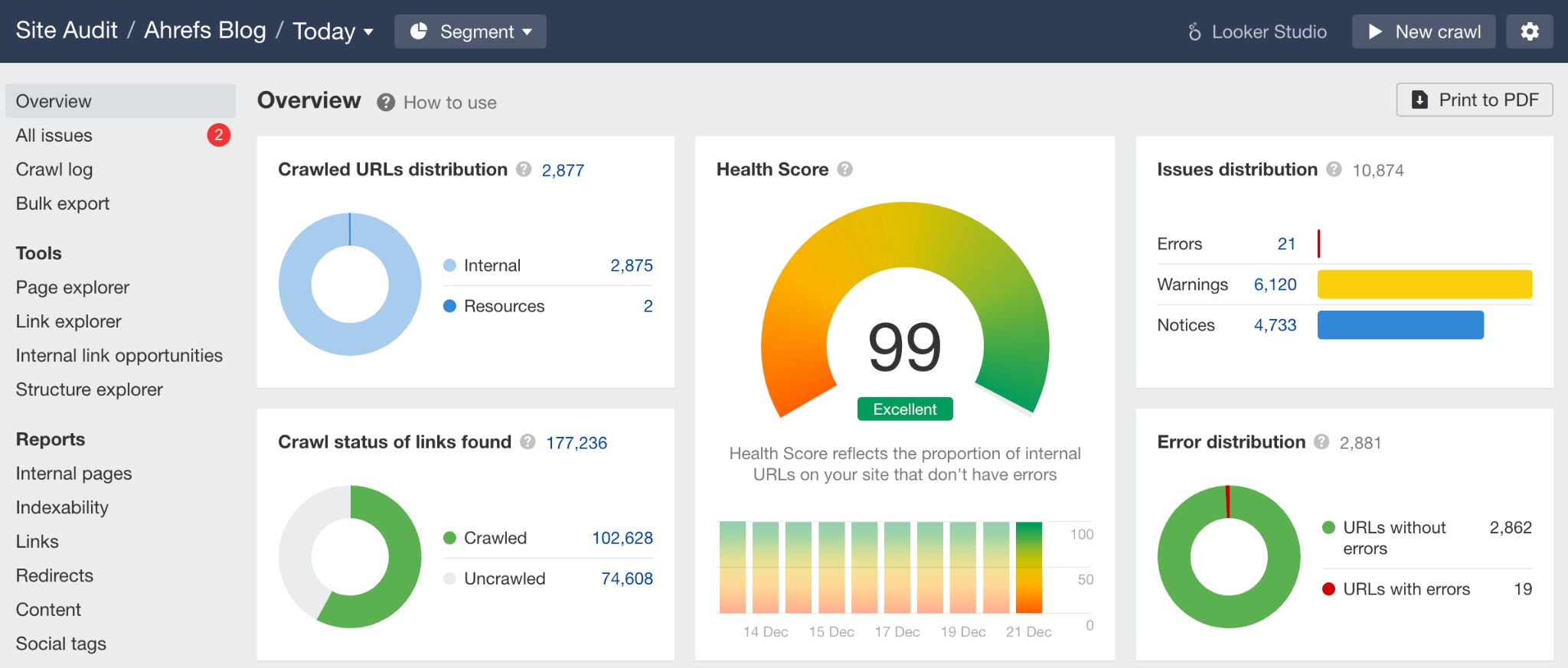
Now that your website is finely tuned from a technical perspective, it’s time to measure its performance using SEO analytics tools. These tools provide valuable insights into how users engage with your site, informing and guiding your ongoing optimization efforts. Two of the most widely used tools in this space are Google Analytics and SE Ranking.
Google Analytics
Google Analytics is a powerhouse for tracking website performance. This free tool allows you to delve deep into various metrics, giving you a clear picture of user behavior and engagement.
- Key Features:
- Detailed reports on user demographics, traffic sources, and page views.
- Real-time data to track how changes impact user behavior instantly.
- Customizable dashboards to focus on metrics that matter most to your business.
A small online bookstore I follow implemented Google Analytics to track user behavior. By analyzing which pages attracted the most traffic, they tailored their content strategy to focus on popular genres, resulting in a significant sales increase.
SE Ranking
SE Ranking complements the insights from Google Analytics with its comprehensive suite of features designed for SEO tracking and reporting. This tool is user-friendly and caters to both beginners and advanced users.
- Key Features:
- Keyword tracking for both organic and paid search efforts.
- Competitor analysis to see how you stack up against others in your niche.
- Website audit tools to identify and rectify issues impacting performance.
For instance, a digital marketing team used SE Ranking to keep tabs on their keyword rankings over time. The tool highlighted sudden drops in rankings, prompting them to adjust their strategies and recover lost visibility.
In conclusion, SEO analytics tools like Google Analytics and SE Ranking provide the necessary data to refine your SEO strategy continuously. By understanding your audience’s behavior and tracking your performance, you can make informed decisions that drive growth. As we move forward, the next section will explore backlink analysis tools that enhance your link-building strategies and boost overall authority.
Backlink Analysis Tools
With a solid understanding of your website’s performance through analytics, the next critical step is to focus on building and maintaining a strong backlink profile. Backlink analysis tools are essential for monitoring your links, understanding their value, and identifying opportunities to enhance your site’s authority. Two notable tools in this area are Linkody and Monitor Backlinks.
Linkody
Linkody is an intuitive tool that focuses on tracking and analyzing your backlinks effectively. Its interface is user-friendly, making it accessible for marketers of all experience levels.
- Key Features:
- Real-time backlink tracking to keep you updated on your link status.
- Detailed reports on the quality of backlinks, including domain authority.
- Alerts for lost links and potential opportunities for regaining them.
A freelance content strategist shared how she used Linkody to monitor backlinks for her clients. By promptly addressing lost links and pursuing new opportunities, she was able to boost her clients’ domain authority and overall search rankings.
Monitor Backlinks
On the other hand, Monitor Backlinks offers a comprehensive suite of features ideal for evaluating and managing your backlink profile. This tool goes beyond just tracking; it provides actionable insights that can help optimize your link-building strategy.
- Key Features:
- Tracking of backlinks with historical data for comparison.
- Keyword ranking features that correlate with your backlinks.
- The ability to analyze your competitors’ backlinks for strategic advantage.
For instance, a small business owner utilizing Monitor Backlinks managed to uncover valuable insights about competitors’ link strategies. By replicating some of these successful approaches, the business experienced a noticeable uptick in organic traffic.
In summary, backlink analysis tools like Linkody and Monitor Backlinks are vital for anyone serious about improving their SEO efforts. By effectively monitoring and analyzing backlinks, businesses can refine their strategies and enhance their site’s authority. Now that we have covered backlink analysis, the next section will explore local SEO tools crucial for businesses looking to improve their presence in local search results.
Local SEO Tools
As we shift our focus to local SEO, businesses can significantly benefit from tools designed specifically to enhance visibility in local search results. Local SEO tools are critical for engaging customers in your area and driving foot traffic. Two standout tools in this realm are BrightLocal and Whitespark.
BrightLocal
BrightLocal is tailored for businesses aiming to improve their presence in local searches. It offers a complete suite of tools that assist in tracking local rankings, managing citations, and monitoring online reviews.
- Key Features:
- Local search rank tracking across multiple locations.
- Citation building and management to ensure your business is correctly listed.
- Comprehensive review monitoring to help you respond promptly and effectively.
For instance, a local fitness center started using BrightLocal to track their search rankings in various neighborhoods. By optimizing their citations and actively managing reviews, they increased their visibility significantly, resulting in a 30% increase in membership inquiries.
Whitespark
Whitespark is another powerful tool in the local SEO toolkit. It helps businesses with citation building and gathering customer reviews to enhance their reputation.
- Key Features:
- Citation finder to identify local business directories for listing.
- Review generation tools to boost positive feedback online.
- Local SEO audit to highlight areas needing improvement.
A small landscaping business owner I know used Whitespark to improve their local listing strategy. By diligently following the tool’s citations recommendations, the owner saw a substantial improvement in their Google My Business ranking, which led to an influx of new clients during the spring season.
In conclusion, local SEO tools like BrightLocal and Whitespark are invaluable for businesses striving to improve their presence in their local markets. These tools not only enhance visibility but also help foster strong community connections. As we move forward, the next section will dive into competitor analysis tools that empower businesses to strategize effectively against their rivals.
Competitor Analysis Tools
With a strong local SEO presence established, it’s time to turn your attention to understanding the competitive landscape. Competitor analysis tools are essential for gaining insights into your rivals’ strategies, allowing you to adapt and refine your own approach. Two robust tools for this purpose are SpyFu and SimilarWeb.
SpyFu
SpyFu is a powerful competitor analysis tool that provides in-depth insights into your competitors’ search marketing strategies. By examining their tactics, you can uncover opportunities to improve your own SEO and PPC campaigns.
- Key Features:
- Access to competitors’ SEO keywords and ad strategies.
- Historical data to track changes in competitors’ marketing tactics.
- A “keyword planner” to find keywords that can enhance your visibility.
For instance, a digital marketing consultant used SpyFu to analyze a competing agency’s keyword strategy. By identifying which keywords they were successfully ranking for, the consultant adjusted their own campaign, leading to a 40% increase in lead generation from organic searches.
SimilarWeb
SimilarWeb provides a comprehensive view of website traffic and engagement metrics for both your site and your competitors’. This tool is invaluable for understanding market trends and user behavior.
- Key Features:
- Traffic statistics and sources, including organic and paid searches.
- Audience behavior insights to understand what drives engagement.
- Industry analysis to benchmark your performance against competitors.
A small eCommerce business owner shared how they leveraged SimilarWeb to track a competitor’s traffic sources. Using insights from the tool, they adapted their content marketing strategy and began focusing more on social media platforms that were driving traffic for their rival, leading to a noticeable uptick in their own website traffic.
In summary, utilizing competitor analysis tools like SpyFu and SimilarWeb empowers businesses to make informed decisions in their SEO and marketing strategies. By understanding what works for your competitors, you can innovate and excel in your own campaigns. As we conclude this exploration of SEO tools, our next focus will turn to SEO Chrome extensions that can enhance your workflow and streamline tasks.
SEO Chrome Extensions
Now that you’ve equipped yourself with various tools for comprehensive SEO analysis and strategy, integrating SEO Chrome extensions into your workflow can further streamline and enhance your efforts. These extensions provide quick access to vital information while you navigate the web. Two must-have extensions are MozBar and Keywords Everywhere.
MozBar
MozBar is an indispensable tool for anyone who wants to access SEO metrics quickly. This browser extension from Moz provides key stats on any webpage you visit, making it easy to analyze competition and identify opportunities on the fly.
- Key Features:
- Instant access to domain authority and page authority metrics.
- The ability to set up custom searches to view specific metrics as you browse.
- Keyword highlights based on on-page optimization.
For example, a content marketer I know used MozBar while researching competitors’ blog posts. With a quick glance, she assessed which articles had strong domain authority and revealed gaps in her own content strategy, ultimately improving her blog’s performance.
Keywords Everywhere
Keywords Everywhere is another essential extension that transforms how you conduct keyword research. By providing keyword data directly in your browser, it saves you time and enhances your strategy.
- Key Features:
- Displays keyword search volume, CPC, and competition data directly in search results.
- Shows related keywords and long-tail variants to expand your research.
- Offers trend data to help identify rising topics.
A freelance writer shared how Keywords Everywhere significantly improved her workflow. By quickly accessing keyword data while drafting content, she targeted specific phrases that led to higher ranking articles, resulting in increased organic traffic.
In summary, SEO Chrome extensions like MozBar and Keywords Everywhere add a layer of efficiency to your SEO analysis and content creation processes. Utilizing these tools allows you to gather critical data without disrupting your workflow. As we’ve covered a variety of SEO tools in this guide, integrating these extensions can simplify and optimize your overall strategy for improved online visibility and engagement.