
Introduction to Email Marketing in HubSpot
Importance of Email Marketing
Email marketing stands as one of the most effective tools in a digital marketer’s toolkit. For brands aiming to build relationships with their audience, the <a href="https://redaezzat.me/social-media-marketing/revolutionizing-digital-engagement-augustines-social-media-mastery/”>importance of email marketing cannot be overstated. It offers a direct line of communication to customers who have opted to receive updates, making it a more intimate and personal channel compared to social media or online ads.
Consider this: the return on investment (ROI) for email marketing is astronomical. According to various studies, every dollar spent on email marketing can yield an average return of $42. This statistic alone exemplifies how crucial it is for businesses to harness the power of email to engage with their audience. Businesses can share targeted messages, promotional offers, and valuable content directly in the inboxes of their subscribers.
Additionally, email marketing helps in nurturing leads and keeping existing customers informed and engaged. For instance, a personal anecdote: after subscribing to a company’s newsletter, I noticed how they consistently provided relevant content about sustainability, aligning with my interests. This targeted approach not only kept me engaged but also ultimately influenced my purchasing decisions.
Incorporating email marketing into a broader strategy allows businesses to:
- Build brand loyalty through consistent communication.
- Drive traffic to websites and landing pages.
- Facilitate customer segmentation for personalized experiences.
Overview of HubSpot Email Tools
HubSpot provides a robust suite of email marketing tools that elevate your marketing efforts. For those unfamiliar, HubSpot is an inbound marketing platform that offers various functionalities, from CRM to social media management. Here’s a closer look at some of the benefits HubSpot offers for email marketing:
- User-Friendly Interface : HubSpot’s email tool is designed for convenience. Marketers can easily create, edit, and track email campaigns without any intricate technical know-how.
- Drag-and-Drop Editor : One of the standout features is the drag-and-drop email editor. Users can create visually appealing emails using pre-designed templates or customize their designs, making it accessible for both beginners and seasoned marketers.
- Personalization and Segmentation : HubSpot excels in personalizing emails. By leveraging contact properties, businesses can tailor messages to different segments of their email list, ensuring relevance and higher engagement rates.
- Analytics and Reporting : Understanding how emails perform is crucial. HubSpot provides detailed analytics, allowing marketers to track opens, clicks, leads, and conversions, enabling them to refine future campaigns.
- Integration with Other HubSpot Tools : The seamless integration with other HubSpot features, such as landing pages, workflows, and social media, allows for a cohesive marketing strategy centered broadly around customer engagement.
Overall, combining the importance of email marketing with HubSpot’s tools creates a powerful approach to building meaningful customer relationships while optimizing marketing efforts for better results. As marketers dive deeper into this section, they will discover how to craft compelling email content, utilize personalization techniques, and ultimately drive engagement and conversions.
Crafting Compelling Email Content
Understanding Your Audience
Once marketers have a grip on the importance of email marketing and the powerful tools HubSpot provides, the next step is crucial: understanding their audience. This foundational knowledge cultivates meaningful conversations and, ultimately, drives conversions.
To truly resonate with subscribers, one must dig deep into their demographics, interests, and preferences. For example, imagine receiving an email that doesn’t align with your interests—a skincare brand promoting a new line of haircare products might leave you wondering why you even subscribed. That’s why research is key! Here are a few practical methods to understand your audience better:
- Segmentation : Divide your audience into smaller groups based on shared characteristics, such as age, location, or past purchase behavior. This enables tailored messaging that speaks directly to each segment.
- Surveys and Polls : Engage your audience with surveys or polls that gather insights about their preferences. This not only provides valuable data but also encourages involvement—increasing the likelihood they’ll remain subscribed.
- Behavioral Tracking : Use tools to track how subscribers interact with previous emails. Highlighting which types of content lead to engagements can refine future emails.
In my experience, segmenting my audience based on their interactions with past emails transformed my approach. Instead of sending a one-size-fits-all email to all subscribers, I tailored content that appealed specifically to each segment, which significantly increased engagement.
Writing Engaging Subject Lines
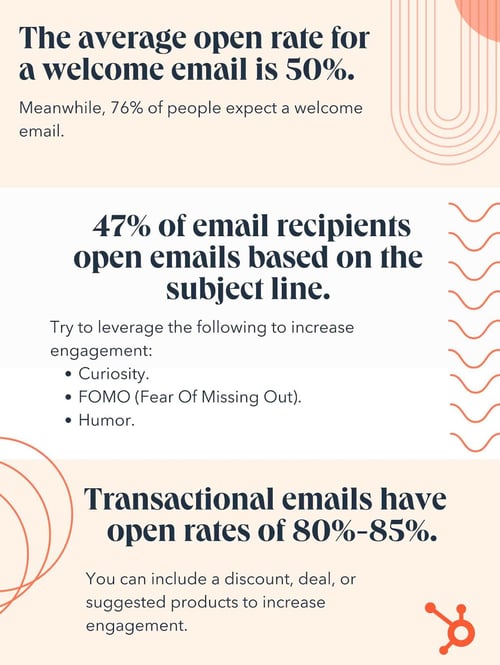
Now that the audience is well understood, the next hurdle is crafting subject lines that grab attention and compel readers to open your emails. Think of subject lines as the first impression—if it’s dull, your meticulously crafted content may never even be seen.
Here are some tips for writing engaging subject lines that can increase open rates:
- Be Clear and Concise : Aim for clarity and brevity. Studies show that subject lines with 6–10 words tend to perform best. Specificity is key—avoid vagueness.
- Example: Instead of “Exciting News Inside,” try “New Eco-Friendly Products Just for You!”
- Create Urgency : Incorporating a sense of urgency can prompt recipients to act quickly.
- Example: “Last Chance: Exclusive Offer Ends Tonight!”
- Personalization : If possible, include the recipient’s name or details relevant to them. Personal touches can increase open rates as they make the email feel more tailored.
- Ask Questions : Questions engage curiosity. This technique invites users to open the email to find out more.
- Example: “Are You Ready to Transform Your Morning Routine?”
- Use Numbers or Lists : Subject lines that promise lists or quantifiable information can be particularly appealing.
- Example: “5 Easy Steps to Boost Your Email Engagement Today!”
In my marketing campaigns, I frequently test different subject lines through A/B testing. This simple approach not only reveals which lines resonate better with my audience but also furthers my understanding of their preferences.
By honing in on the nuances of your audience and crafting engaging subject lines, marketers can significantly enhance the impact of their email campaigns in HubSpot. The next sections will dive deeper into effective personalization techniques, ensuring each email resonates deeply with its recipient.
Personalization Techniques in Email
Leveraging HubSpot Personalization Tokens
Continuing from the importance of understanding your audience and crafting engaging email content, one of the most powerful tools at a marketer’s disposal is personalization. HubSpot provides various features to help marketers tailor their messages, and among the most effective are personalization tokens. Personalization tokens enable businesses to create highly tailored emails that resonate with individuals rather than vague groups.
So, what exactly are personalization tokens? Simply put, they’re placeholders that pull in specific contact information from your database. This could be anything from a subscriber’s name to their company name or even their last purchase date. Here’s how to make the best use of these tokens:
- Greeting and Salutations : Start your emails with a warm greeting using the recipient’s first name. Instead of starting with a generic “Dear Subscriber,” try “Hi [First Name], we have something special for you!” This creates an immediate connection and makes the recipient feel valued.
- Tailored Offers : Use tokens to highlight past interactions. For example, “As a fan of [Product/Service], we thought you might enjoy our latest collection!” This not only shows that you recognize their interests but also encourages further engagement.
- Location-Based Content : If your business operates in multiple regions, consider using geographic tokens to customize content. For instance, “We’re excited to announce our new store opening in [City Name]!” This aspect allows for a geographically relevant approach that resonates with local subscribers.
I’ve personally witnessed the effectiveness of personalization tokens. Once, a campaign featured personalized recommendations based on past purchases. The resulting increase in open rates and conversions was astonishing—subscribers felt like the message was catered specifically to them.
Dynamic Content Creation Strategies
While personalization tokens set the scene for customization, dynamic content takes it a step further by ensuring that the right content appears to the right audience based on their characteristics or behaviors. Dynamic content adapts within an email according to the viewer, leading to a unique experience for each recipient. Here’s how to implement dynamic content creation effectively:
- Behavioral Triggers : Analyze your audience’s previous interactions with your emails. If a subscriber frequently clicks on articles related to specific topics, tailor future emails to include similar content dynamically.
- Product Recommendations : For eCommerce brands, including dynamic product recommendations based on subscribers’ browsing histories can significantly boost engagement and sales. Consider showcasing “Recommended for You” sections based on their preferences.
- Event-based Customization : Use dynamic content to celebrate milestones. For example, acknowledging a subscriber’s anniversary with your brand can foster loyalty. A simple “Happy Anniversary, [First Name]! Here’s a special offer just for you!” can be very effective.
- User-generated Content : Feature testimonials or reviews dynamically related to the products viewed by the subscriber. This approach builds trust, encouraging readers to take action.
Through my experiences, I found that dynamic content not only engages existing customers but also nurtures potential leads. In one campaign, dynamically showcased social proof led to a significant increase in conversion rates as prospects felt reassured by authentic customer experiences.
By leveraging HubSpot’s personalization tokens and incorporating dynamic content strategies, marketers can foster deeper connections with their audience. This personalized approach can significantly enhance engagement levels and ultimately drive conversions. In the next sections, we’ll explore strategies for driving email engagement and conversions effectively.
Driving Email Engagement and Conversions
Designing Call-to-Action Buttons
With a strong foundation in personalization techniques laid down, the next critical step in email marketing is driving engagement and conversions. A vital component of this focus is the call-to-action (CTA) button. The CTA is often the primary destination of your email, guiding subscribers toward the next step you want them to take—whether it’s visiting your website, signing up for a webinar, or making a purchase.
To design compelling CTA buttons that drive action, consider the following strategies:
- Use Action-Oriented Language : Ensure that the text on your CTA is clear and instructive. Phrases like “Download Now,” “Get Your Discount,” or “Join the Webinar” clearly define the action and create urgency.
- Design Matters : A well-designed button stands out. Use contrasting colors that catch the eye but still align with your overall branding. Ensure the button is large enough to be easily clickable, especially on mobile devices.
- Position Wisely : Strategically place CTA buttons within the email to maximize visibility. Testing different placements can reveal optimal spots—consider placing them both at the top and bottom of the email.
- Limit Options : Too many choices can overwhelm readers. Instead of cluttering an email with multiple CTAs, focus on one primary action. This directs the subscriber toward a singular goal.
From personal experience, I’ve noticed that a well-placed “Shop Now” button in a promotional email led to a significant uptick in customer engagement during flash sale events. It was the clarity and urgency that drove conversions—subscribers knew exactly what they were expected to do.
A/B Testing Email Campaigns
Once you have your call-to-action buttons set, the next step in refining your strategy is continuous improvement through A/B testing. A/B testing involves sending two variations of an email to see which performs better based on specific metrics, such as open rates, click-through rates, or conversion rates. This can be an incredibly powerful tool in optimizing your email campaigns.
Here’s how to implement A/B testing effectively:
- Test One Variable at a Time : To accurately assess what impacts performance, isolate one variable in each test—be it the subject line, CTA button text, images, or even sending times—this ensures that you can attribute changes in performance to that specific element.
- Analyze Performance Data : Pay close attention to the metrics you’ve established as your goals. If you’re testing subject lines, analyze open rates; for CTA buttons, focus on click-through rates.
- Iterate and Optimize : Use the insights gained from each test to optimize future campaigns. The beauty of A/B testing is that it fosters an ongoing cycle of improvement. It’s worth noting that not every test will yield positive results, but every test offers valuable information.
- Involve Your Audience : Occasionally involve your audience in A/B tests by letting them choose between two subjects or promotions. This engagement can further strengthen the connection between you and your subscribers.
In a previous marketing campaign, I conducted an A/B test on two different subject lines for a holiday sale email. The result showed that a direct offer of “30% Off Storewide!” outperformed a more vague “Don’t Miss Our Holiday Deals.” This valuable insight allowed me to tailor future communications with a sharper focus on clear offers, leading to enhanced engagement.
By carefully designing CTA buttons and employing A/B testing, marketers can effectively drive engagement and conversions, turning potential leads into loyal customers. Following these strategies can significantly maximize the impact and effectiveness of email campaigns. Next, we’ll delve into automation and segmentation strategies for even more precise targeting in future communications.
Automation and Segmentation Strategies
Setting up Email Workflows in HubSpot
As we transition from the techniques that drive engagement and conversions, it’s essential to look at how automation can further streamline email marketing efforts. HubSpot’s powerful automation capabilities allow marketers to nurture leads and maintain customer relationships efficiently. Setting up email workflows is a fundamental part of this process.
Email workflows help automate the process of sending targeted messages based on specific triggers, ensuring the right content reaches the right people at the right time. Here’s how to set up effective email workflows in HubSpot:
- Define Your Goals : Start by outlining the objectives of your workflow. It could be to onboard new customers, nurture leads, or re-engage inactive subscribers. Defining clear goals helps shape the content and triggers for the workflow.
- Choose Your Triggers : Triggers initiate workflows based on specific actions taken by subscribers, such as signing up for a newsletter or downloading an eBook. These triggers help ensure your emails are contextually relevant.
- Design the Workflow Steps : Map out a structured series of emails that guide subscribers through the desired journey. This could involve sending thank-you emails, offering curated content, or delivering personalized product recommendations over a series of days or weeks.
- Personalize Your Messages : Incorporate personalization tokens within your workflows to further tailor content to individual subscribers, enhancing relevance and engagement.
- Monitor and Adjust : After launching your workflow, routinely monitor its performance through HubSpot’s analytics. Look for open rates, click-through rates, and conversions. Use these insights to make necessary adjustments for optimizing future campaigns.
In my experience, setting up automated workflows for onboarding new customers significantly cut down response times and enhanced engagement. Customers received timely information based on their actions, making them feel cared for right from their first interaction with the brand.
Segmenting Your Email List for Targeted Campaigns
While automation ensures timely communication, segmentation is crucial for ensuring the messages resonate deeply with specific audience groups. By dividing your email list into distinct segments based on shared characteristics, marketers can tailor campaigns effectively. Here’s how to implement segmentation strategies:
- Demographic Segmentation : Consider factors like age, location, and occupation to create targeted segments. For instance, a clothing brand may send different promotions to men, women, and those who prefer children’s clothing.
- Behavioral Segmentation : Analyze how subscribers interact with previous emails, their purchasing history, and online behavior. This data allows for truly customized campaigns. For example, someone who frequently clicks on fitness content might be interested in a new workout series.
- Engagement Level : Segment your audience based on their interactions, such as highly engaged customers versus inactive subscribers. Tailor re-engagement campaigns to reignite interest among the less active segments.
- Lifecycle Stage : Recognize the various stages in the customer journey—from first-time visitors to loyal customers. Each stage requires different communication strategies. For instance, loyal customers may appreciate exclusive offers, while new leads may benefit from introductory content.
- Feedback and Surveys : Utilize feedback from surveys to inform segmentation. Knowing preferences allows marketers to segment their lists more effectively, leading to enhanced engagement.
Throughout my campaigns, segmenting my email list based on customer engagement levels proved invaluable. Sending targeted re-engagement emails to inactive subscribers led to a noticeable increase in interactions.
By leveraging email workflows in HubSpot and employing effective segmentation strategies, marketers can deliver nuanced communications that cater to their audience’s needs. This approach not only enhances engagement but also builds longer-lasting customer relationships. Next, we’ll explore advanced techniques for maximizing the effectiveness of your email marketing strategies.