
Introduction
Understanding HubSpot Dynamic Emails
In today’s increasingly competitive digital landscape, understanding and effectively utilizing tools like HubSpot’s dynamic emails is essential for any marketing strategy. Dynamic emails are a game changer, allowing marketers to craft highly personalized content that responds to the unique needs and preferences of each recipient. This not only fosters engagement but also drives conversions.
Dynamic emails can deliver tailored messages based on user behavior, preferences, and demographic data. For instance, a travel agency could send a dynamic email featuring personalized vacation packages. If a customer has previously searched for beach destinations, they might see enticing offers to tropical getaways, whereas others may receive promotions for mountain retreats. Such tailored experiences make subscribers feel valued and understood, significantly enhancing open and click-through rates.
Key benefits of leveraging dynamic emails include:
- Improved Engagement : Personalized content engages users more effectively than generic messages.
- Higher Conversion Rates : When recipients see content that resonates with their preferences, they are more likely to take action.
- Enhanced Customer Loyalty : Dynamic emails build a relationship with customers by making them feel recognized.
Imagine receiving an email that directly addresses a recent interaction you had with a brand. This kind of thoughtful communication not only captures attention but reinforces brand loyalty. By understanding how to harness the power of HubSpot’s dynamic emails, marketers can create memorable experiences that resonate and convert, setting the stage for successful email campaigns.
Leveraging HubSpot Email Templates
When diving into the world of dynamic emails, one critical aspect to consider is how to effectively leverage HubSpot email templates. These templates provide a powerful foundation for creating visually appealing and conversion-focused email campaigns, making the process not only easier but also more efficient.
Ready-to-Use Templates
HubSpot offers a variety of pre-designed email templates that cater to different industries and marketing strategies. This means that even without extensive design skills, marketers can create polished and professional emails. For example, a nonprofit organization might select an engaging fundraising template that highlights their mission, complete with compelling images and clear calls-to-action.
Some advantages of using HubSpot email templates include:
- Time-Saving : With customizable templates at your disposal, you can significantly cut down on design time.
- Consistency : Consistent branding across emails helps build trust and recognition among your audience.
- Easy Customization : HubSpot’s drag-and-drop editor allows you to tailor templates to match your unique brand voice and goals.
Creating Your Own Templates
For those with specific needs or a unique brand aesthetic, HubSpot also enables users to design their custom email templates. This flexibility empowers marketers to create emails that align more closely with their campaign objectives.
Consider this: a local restaurant can create a template showcasing mouth-watering images of their signature dishes while including dynamic content that highlights special offers for frequent diners. This personal touch can lead to increased engagement and customer retention.
By leveraging the power of HubSpot email templates, marketers can enhance their email campaigns and deliver tailored, visually appealing content that captures attention and drives results. Ultimately, it streamlines the entire process, allowing teams to focus on what truly matters: building meaningful connections with their audience.
Customizing Dynamic Content Modules
Once marketers have mastered leveraging HubSpot email templates, the next step is to focus on customizing dynamic content modules. This feature allows brands to personalize their messaging even further, ensuring that every subscriber receives relevant and targeted information tailored to their preferences.
The Power of Dynamic Content
Dynamic content modules are sections of an email that can change based on the recipient’s data. This means that marketers can display different images, text, or offers to different segments of their audience, all within the same email. For instance, a fitness brand could use dynamic content to showcase workout programs based on a recipient’s fitness level—beginner, intermediate, or advanced.
Benefits of customizing dynamic content modules include:
- Relevance : Tailoring content increases the likelihood that recipients will resonate with the message, leading to higher engagement.
- Targeted Offers : Highlighting specific promotions or products can significantly boost conversion rates; for example, offering a discount on yoga mats to yoga enthusiasts.
- Enhanced User Experience : Subscribers appreciate receiving content tailored to their interests; it feels like a conversation rather than a sales pitch.
Practical Implementation
To implement dynamic content effectively, marketers can start by segmenting their audience based on criteria such as behavior, location, or previous purchases. For instance, an e-commerce platform might identify customers who frequently purchase outdoor gear and send them a customized email featuring new arrivals in the camping section, complete with vibrant images and specialized offers.
By investing time in customizing dynamic content modules, marketers can create emails that are not only visually appealing but also highly relevant. This ensures that each message feels personal, helping to foster relationships and build brand loyalty among subscribers.
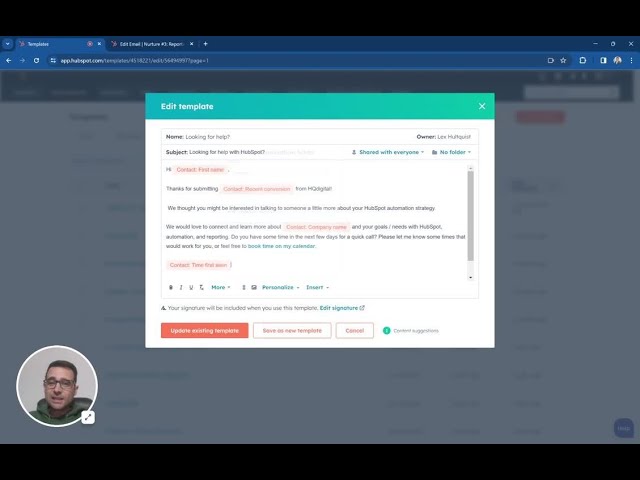
Implementing Personalization Tokens
Having explored the ins and outs of customizing dynamic content modules, the next key strategy for enhancing email campaigns is implementing personalization tokens. This powerful feature allows marketers to insert specific, personalized information about subscribers into their emails, making each message feel uniquely crafted for every individual.
The Magic of Personalization Tokens
Personalization tokens can be anything from a recipient’s name to their purchase history or even location-based information. Including these tokens can transform a generic email into a tailored experience. For example, imagining receiving an email that starts with “Hi Sarah, based on your recent interest in hiking gear, check out these exclusive deals!” feels way more engaging compared to a standard greeting.
Benefits of using personalization tokens include:
- Increased Engagement : Emails that feel personal are more likely to be opened and read, improving overall engagement rates.
- Stronger Connection : Personal touches reinforce the brand-consumer relationship, making recipients feel valued and understood.
- Higher Conversion Rates : Targeted offers based on previous interactions increase the chance that recipients will take action.
Best Practices for Implementation
To effectively implement personalization tokens, marketers should ensure that their contact lists are well-segmented and up-to-date. It’s essential to gather relevant data beforehand; this could include:
- Customer names
- Previous purchase details
- Browsing behavior
By leveraging these insights, a clothing retailer could personalize its emails with tokens like “We think you’ll love these summer dresses, Emily!”
With the strategic use of personalization tokens, marketers can elevate their email campaigns from simply informative to incredibly engaging. The result? Higher open rates, better engagement, and ultimately, improved conversion outcomes. In the world of email marketing, these small touches can lead to significant results.
Utilizing HubSpot Workflow Automation
Having established the importance of personalization tokens, the next logical step in optimizing email campaigns is to leverage HubSpot’s workflow automation. Automated workflows can streamline your marketing efforts, ensuring that every email sent is timed and targeted to maximize impact. One effective way to do this is by creating segmented email lists.
Creating Segmented Email Lists
Segmentation enables marketers to divide their contact lists into smaller groups based on specific criteria such as demographics, interests, behaviors, or previous interactions. This approach ensures that the right message reaches the right audience, ultimately enhancing engagement.
For instance, consider a software company launching a new product. By segmenting their email list into categories like existing customers, potential leads, and inactive users, they can tailor their messaging accordingly:
- Existing Customers : Highlight new features and upgrades.
- Potential Leads : Provide case studies and testimonials to encourage sign-up.
- Inactive Users : Send personalized re-engagement offers or feedback requests.
The benefits of creating segmented email lists include:
- Targeted Messaging : Tailored content leads to higher open and click-through rates.
- Improved Customer Experience : Subscribers receive relevant information that resonates with their needs and interests.
- Data-Driven Decisions : Segmenting allows marketers to analyze which groups respond best to specific campaigns, refining their strategies over time.
Putting It into Action
To create effective segmented email lists in HubSpot, users should regularly update their contact information, monitor engagement metrics, and apply filters based on chosen criteria. With these segmented lists in place, marketers can set up workflows that automate email sends triggered by specific actions, such as a sign-up or a recent purchase.
In conclusion, utilizing HubSpot’s workflow automation to create segmented email lists empowers marketers to nurture leads effectively, enhance customer relationships, and drive higher conversion rates. The strategic segmentation of audiences ultimately sets the stage for more meaningful interactions and long-term loyalty.
Integrating Dynamic Data Sources
With segmented email lists in place, the next critical step in enhancing email marketing campaigns is to integrate dynamic data sources. This integration allows marketers to pull real-time information directly into their emails, creating a more engaging and personalized experience for their subscribers.
The Value of Dynamic Data Integration
Dynamic data sources refer to live information that can change based on user interactions, preferences, or other factors. For example, e-commerce businesses can pull in product availability, pricing, and even customer browsing history to customize recommendations in their emails. Imagine a customer receiving an email with personalized product suggestions based on their previous purchases—it’s an effective way to remind them of items that pique their interest.
The benefits of integrating dynamic data sources include:
- Real-Time Updates : Information in emails reflects the latest data, keeping customers informed and engaged.
- Personalized Content : Marketers can deliver targeted offers that resonate with specific user interests, increasing the likelihood of conversion.
- Enhanced Customer Journey : By using dynamic data, brands can offer a seamless experience that aligns with customers’ past behaviors.
Practical Steps for Integration
To effectively integrate dynamic data sources in HubSpot, marketers should consider the following steps:
- Identify Data Sources : Choose data points that align with marketing goals, such as transaction history or user preferences.
- Set Up API Connections : HubSpot supports API integrations that allow data to flow seamlessly into your email campaigns.
- Utilize Custom Properties : Leverage custom properties in your contact database to capture unique data that can enhance personalization.
By integrating dynamic data sources, marketers can take their email campaigns to the next level, ensuring that every interaction feels specific and relevant. This strategy not only boosts engagement but can also lead to greater customer satisfaction—making each subscriber feel valued and understood. In a world where personalization is key, integrating real-time data is essential for nurturing effective client relationships.

A/B Testing Dynamic Email Campaigns
Having established how to integrate dynamic data sources into email campaigns, the next crucial step is to employ A/B testing for dynamic email campaigns. Testing different elements not only helps in refining strategies but also enables marketers to understand their audience better.
Understanding A/B Testing
A/B testing, or split testing, involves sending two variations of an email to segments of your audience to determine which one performs better. This approach can apply to many different elements within dynamic emails, such as subject lines, call-to-action buttons, or even images. For instance, a travel agency might test two subject lines: “Discover Exotic Destinations this Summer!” versus “Your Next Adventure Awaits – Exclusive Deals Inside!”
By analyzing which version garners higher open or click-through rates, brands can make data-driven decisions for future campaigns.
The benefits of A/B testing dynamic emails include:
- Enhanced Engagement : Understanding what resonates with your audience leads to more appealing and effective messaging.
- Increased Conversion Rates : Testing helps identify the best-performing elements, which can directly impact purchases or sign-ups.
- Continuous Improvement : A/B testing fosters a culture of experimentation, encouraging ongoing adjustments based on real results rather than assumptions.
Implementing A/B Testing Effectively
To maximize the effectiveness of A/B testing in email campaigns, marketers should consider these steps:
- Define Clear Objectives : Determine what you want to learn from the A/B test—whether it’s improving click rates, boosting conversions, or enhancing engagement.
- Test One Element at a Time : Focus on a single variable for each test to ensure clarity in the results.
- Analyze Results : Use analytics to assess which variation performed better and draw insights to apply to future campaigns.
By incorporating A/B testing into their strategy, marketers can harness the power of dynamic email campaigns, optimizing their outreach efforts continuously. This proactive approach ensures that brands are not just reaching their audience but genuinely connecting with them, enhancing the overall customer experience.
Optimizing Email Performance Metrics
After implementing A/B testing in dynamic email campaigns, it’s time to focus on optimizing email performance metrics. Tracking and analyzing these metrics allows marketers to fine-tune their strategies and improve overall campaign effectiveness, ensuring that every email sent serves a purpose.
The Importance of Email Performance Metrics
Email performance metrics provide insights into how well your campaigns resonate with your audience. Key metrics to monitor include:
- Open Rate : This indicates how many recipients opened your email, which can reflect the effectiveness of your subject lines.
- Click-Through Rate (CTR) : This measures the percentage of recipients who clicked on links within the email, highlighting the content’s relevance and engagement factor.
- Conversion Rate : This metric reveals how many recipients took a desired action after clicking, such as making a purchase or signing up for a webinar.
- Bounce Rate : Monitoring bounce rates helps in maintaining a healthy email list by identifying invalid email addresses.
Understanding these metrics allows marketers to pinpoint areas for improvement. For example, if the open rate is low, it may be time to experiment with more compelling subject lines or send times.
Strategies for Optimization
To effectively optimize email performance metrics, consider these strategies:
- Segment Your Audience : Tailor messages to different audience segments to enhance relevance and engagement.
- Personalize Content : Use metrics from previous campaigns to personalize future emails based on past behaviors or preferences.
- Timing Matters : Test different send times and frequencies. For example, a brand might find that emails sent on Wednesdays see higher engagement than those sent during the weekend.
- Iterate and Improve : Regularly analyze performance data and make iterative changes based on your findings.
By continually optimizing these metrics, marketers can enhance the effectiveness of their email campaigns and ultimately drive better results. Fostering a mindset focused on improvement and learning will lead to more meaningful connections with subscribers, reinforcing brand loyalty and driving business growth.