Introduction
Overview of Salesforce Marketing Cloud
Salesforce Marketing Cloud is a comprehensive digital marketing platform that enables brands to effectively engage with their audiences across various channels. It offers a myriad of tools designed to streamline marketing processes, enhance customer relationships, and drive growth. As a marketer, navigating through this robust platform can feel overwhelming at first, but it ultimately empowers businesses to reach their fullest potential through tailored marketing strategies.
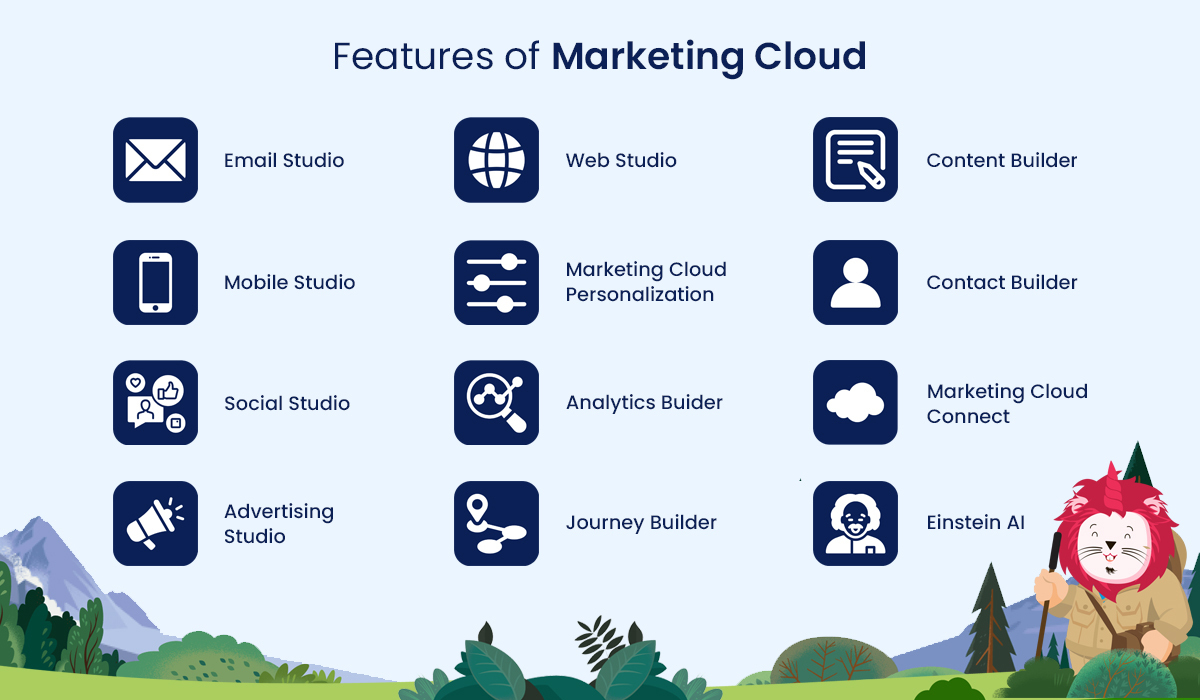
Key features of Salesforce Marketing Cloud include:
- Email Marketing Tools: Create, send, and analyze captivating email campaigns.
- Social Media Marketing : Run targeted campaigns across popular social platforms.
- Advertising Integration : Reach customers through paid ads while tracking performance in real-time.
- Data Management: Utilize data analytics to gain insights into customer behavior and preferences.
By leveraging these tools, marketers can personalize their outreach, ensuring that messages resonate with recipients and encouraging more meaningful interactions.
Importance of Inbound Emails
Inbound emails are a crucial component of any marketing strategy, particularly in connecting with potential customers. Unlike traditional outbound methods that interrupt users’ experiences, inbound emails build relationships by providing valuable content that meets the audience’s needs.
Consider this scenario: A marketer sends out a weekly newsletter packed with tips, insights, and exclusive offers. Over time, recipients begin to recognize the brand as a trusted resource, leading to higher engagement rates and stronger brand loyalty. Here are some benefits of prioritizing inbound emails:
- Increased Engagement : Recipients are more likely to interact with content when it is relevant and valuable to them.
- High Conversion Rates : Personalized emails most often yield better results, turning leads into customers.
- Cost Effectiveness : Compared to traditional advertising, email marketing is budget-friendly with potential for high returns.
Understanding the significance of inbound emails allows brands to harness the full potential of Salesforce Marketing Cloud, setting a strong foundation for successful email campaigns.

Getting Started with Salesforce Marketing Cloud
Setting Up Your Account
When diving into Salesforce Marketing Cloud, the first step is to set up your account. This process is crucial as it lays the groundwork for accessing the platform’s features and tools. After signing up, you’ll receive a confirmation email where you can verify your credentials and create a secure password. Remember, a strong password is key to keeping your marketing data safe.
Once you gain access, you will want to tailor your account settings. Here’s how to get started:
- Access the Setup Menu : This is your control center where you can manage users, set preferences, and configure the platform.
- Configure User Roles : If you’re working within a team, assign roles based on individual responsibilities. This ensures that everyone has access to the tools they need.
- Connect Data Sources : Integrate other platforms and tools you are using, such as CRM systems, to streamline data flow.
Getting everything set up can feel like a lot, but taking it step by step makes the process less daunting.
Navigating the Interface
After you’ve successfully set up your account, it’s time to familiarize yourself with Salesforce Marketing Cloud’s interface. The layout is designed to be intuitive, with a main dashboard that serves as your navigational hub. Here’s a quick rundown of what to expect:
- Main Navigation Bar : Located on the left side, it holds tabs for Email Studio, Automation Studio, and more, providing quick access to various features.
- Dashboard Overview : Your dashboard provides an at-a-glance view of your recent campaigns, performance metrics, and other essential insights.
- Help and Resources : The built-in help section offers tutorials, forums, and documentation to assist you as you explore the platform.
Personal experience shows that taking a little time to explore various sections—perhaps while sipping coffee—can yield incredible insights into how everything works. Before long, you’ll navigate the interface with ease, allowing you to focus on creating impactful email campaigns and maximizing the capabilities of Salesforce Marketing Cloud.

Creating Inbound Email Campaigns
Understanding Email Segmentation
Once you’ve mastered the basics of Salesforce Marketing Cloud, it’s time to create effective inbound email campaigns. A key strategy in this process is understanding email segmentation. This means dividing your audience into smaller, more targeted groups based on specific criteria such as demographics, behavior, or engagement history.
Why is segmentation important? Well, sending a generic email blast to your entire list may yield lackluster results. Instead, segmenting your audience allows you to tailor your messages to specific interests or behaviors, ultimately leading to higher open and click-through rates. Here are a few segmentation strategies to consider:
- Demographic-based Segmentation : Group users based on age, gender, or location. For example, a retail company might send different emails promoting seasonal products to young adults versus seniors.
- Behavioral Segmentation : Target users based on how they interact with your previous campaigns. If someone frequently clicks on promotional deals, they might appreciate an email focused solely on discounts.
- Engagement Level : Create segments for frequent buyers, occasional shoppers, and even disengaged subscribers. This allows for tailored re-engagement campaigns for those who need a little extra motivation.
Designing Engaging Email Content
Now that you’ve segmented your audience, it’s time to design engaging email content that resonates with each group. Crafting impressive emails can enhance user experience and drive conversions.
Here are some essential tips for creating engaging email content:
- Personalization : Use the recipient’s name and reference their past purchases or preferences. Personalization can significantly enhance open rates—after all, everyone likes seeing their name in print!
- Compelling Subject Lines : Your subject line is the first impression. Keep it short, intriguing, and relevant to encourage opens. Think of something like “Unlock Your Exclusive Discount Inside!”
- Visual Appeal : Use images, colors, and easily readable fonts to create a visually pleasing layout. A well-designed email will keep readers engaged.
- Clear Call-to-Action (CTA) : Make sure your CTA stands out. Whether it’s “Shop Now” or “Learn More,” the button should be easily identifiable and compel users to take action.
By focusing on segmentation and creating captivating content, you can boost the effectiveness of your inbound email campaigns. Not only will you increase engagement, but you’ll also convert more leads into loyal customers. Reflect on your experience with previous emails to continually refine your approach—every campaign is a stepping stone to greater success!
Personalization and Automation in Inbound Emails
Implementing Dynamic Content
As we delve deeper into creating effective inbound email campaigns, personalization and automation emerge as powerful strategies. One exciting way to enhance personalization is through the use of dynamic content in your emails. Dynamic content allows you to tailor portions of your email based on the recipient’s attributes and behaviors—this means that different users see different content without needing to create multiple versions of the same email.
For instance, if you’re running a promotion for a fitness brand, you might use dynamic content to show different products based on a customer’s previous purchases or browsing behavior. A customer who previously bought running shoes might see running apparel and accessories, while someone interested in yoga could see yoga mats and attire.
Key benefits of implementing dynamic content include:
- Increased Relevance : Tailored content resonates more with recipients, leading to higher engagement.
- Improved Customer Experience : By anticipating needs, you create a positive impression and encourage loyalty.
- Higher Conversion Rates : Personalized offers often yield better results, as recipients are presented with what they truly want.
Embracing dynamic content technology is made easier within Salesforce Marketing Cloud, allowing marketers to craft engaging, tailored messages effortlessly—leaving a lasting impact on the audience.
Setting Up Email Automation
Building on the foundation of personalization, setting up email automation can further elevate your inbound email campaigns. Automation allows you to send timely messages triggered by user actions or specific dates without manual intervention.
Imagine this scenario: a customer joins your mailing list after making a purchase. With email automation, they can automatically receive a “Thank You” email along with helpful product tips a few days later. This not only shows excellent customer service but also positions your brand as thoughtful and attentive.
Here are some steps to effectively set up email automation:
- Define Trigger Actions : Identify the actions that will trigger emails. This could include sign-ups, abandoned carts, or anniversaries.
- Create Email Workflows : Use pre-built templates in Salesforce Marketing Cloud to design workflows that dictate the sequence of automated emails.
- Test and Optimize : Regularly assess the effectiveness of your automated campaigns. A/B testing subject lines or email designs can provide valuable insights for further optimizations.
Incorporating both dynamic content and automated strategies into your email marketing efforts will not only enhance personalization but also save time while keeping your campaigns relevant and impactful. Your audience will appreciate the attention to detail, leading to deeper relationships and increased loyalty!
Monitoring and Analyzing Email Performance
Tracking Key Metrics
With dynamic content and email automation in place, the next step in enhancing your inbound email campaigns is to monitor and analyze their performance. Tracking key metrics is essential to understanding what works, what doesn’t, and how to adjust your strategy accordingly.
In Salesforce Marketing Cloud, some vital metrics to keep an eye on include:
- Open Rate : This metric indicates how many recipients opened your email. A low open rate might suggest that your subject lines aren’t compelling enough. Consider experimenting with A/B testing to find out what resonates with your audience.
- Click-Through Rate (CTR) : This measures how many people clicked on links within your email. A strong CTR indicates that your email content is engaging and relevant to your recipients.
- Conversion Rate : Ultimately, you want to monitor how many email recipients completed the desired action, such as making a purchase or signing up for a webinar. This metric helps gauge the effectiveness of your call-to-action.
- Unsubscribe Rate : Keep an eye on this metric as well. If you notice a spike in unsubscribes, it could point to issues with email frequency or content relevance.
For example, during a recent campaign for a seasonal sale, tracking these metrics helped an e-commerce platform realize that their open rates significantly dropped after sending out two back-to-back promotional emails. Adjusting their frequency not only improved engagement but also fostered better relationships with their audience.
Optimizing Email Campaigns
Once you have a clear view of these key metrics, it’s time to optimize your email campaigns. This process involves refining your strategy to improve user engagement and drive better results. Here are some strategies to get you started:
- Segment Your Audience Further : Noticing that specific segments engage more? Create even more tailored content for those groups to enhance relevance.
- Experiment with Subject Lines : If open rates are lacking, consider varying the length, tone, or urgency of your subject lines. Testing different approaches can reveal what captures your audience’s attention.
- Refine Your Timing : Analyze data to determine optimal send times. Sending emails when recipients are most likely to check their inboxes can significantly boost open rates.
- Personalize More : Consider adding personalized product recommendations or relevant location-based offers to make emails even more engaging.
By continually monitoring key metrics and implementing these optimization strategies, your inbound email campaigns can evolve over time. This adaptability leads to better results, ensuring that your marketing efforts truly resonate with your audience, ultimately fostering loyalty and driving sales.

Integrating Salesforce Marketing Cloud with CRM Systems
Enhancing Lead Management
With metrics tracked and campaigns optimized, the next level of your email marketing strategy can come from integrating Salesforce Marketing Cloud with your Customer Relationship Management (CRM) system. This integration significantly enhances lead management, allowing you to streamline your marketing efforts and improve customer interactions.
By connecting these two powerful tools, your marketing team can achieve a comprehensive view of each lead’s journey—from initial contact to conversion. Here’s how this integration makes a difference:
- Centralized Information : Your team gains access to complete profiles on each lead, enabling personalized communication based on past interactions and preferences. This eliminates the guesswork in crafting messages.
- Real-time Updates : When leads engage with your inbound emails, this information updates in the CRM instantly. This means that whoever is on the sales team can follow up promptly based on recent lead interactions.
- Improved Lead Scoring : Integrating Marketing Cloud data into your CRM allows for more accurate lead scoring based on engagement metrics. This enables sales teams to prioritize high-value leads, improving conversion rates.
For example, during an event, one company saw immediate benefits after integrating its CRM with Salesforce Marketing Cloud. As leads filled out forms or interacted with follow-up emails, their sales team received real-time insights. This immediate access led to timely follow-ups, significantly increasing the chances of conversion.
Syncing Data for Personalized Campaigns
The benefits don’t stop there; syncing data between Salesforce Marketing Cloud and your CRM system empowers you to create more personalized campaigns. When you harness this data collaboration, your outreach becomes more relevant and impactful.
Consider these advantages of syncing data:
- Comprehensive Customer Profiles : By merging CRM data with Marketing Cloud’s email engagement metrics, you can create detailed customer profiles. This allows you to segment your audience effectively and deliver personalized content.
- Behavioral Insights : Syncing allows you to track how recipients interact with your emails across multiple touchpoints. Understanding these behaviors enables you to fine-tune your messages for maximum engagement.
- Lifecycle Campaigns : With synced data, you can design campaigns that align with where customers are in their journey. Whether someone is a new lead, a loyal customer, or somewhere in between, tailored messaging can provide just the right nudge.
Through this integration, a finance firm was able to launch a targeted campaign that significantly boosted engagement rates among existing clients. By understanding their clients’ needs, the firm crafted tailored financial advice directly in their email communications.
Integrating Salesforce Marketing Cloud with your CRM system transforms the way you engage with leads and customers. By enhancing lead management and syncing data for personalized campaigns, you position your brand as attentive, relevant, and ultimately, more likable.