
Introduction
Importance of SEO for Website Ranking
When it comes to the digital landscape, visibility is everything. No business wants to be like a needle in a stacked hayloft, right? This is where Search Engine Optimization (SEO) shines. Simply put, SEO is crucial for website ranking because it determines how easily your website can be found on search engines like Google. Imagine putting a signboard in your shop that displays all the essential information; SEO acts like that sign, but on the vast Internet highway.
- Higher Visibility : SEO improves your website’s ranking, making it more accessible to potential customers.
- Increased Traffic : The higher the rank, the more visitors. It’s like hosting a sale in a downtown area versus a remote corner; the footfall is immensely different.
- Brand Credibility : Users tend to trust websites that appear at the top of search results, enhancing your brand’s credibility.
Benefits of Improving SEO on Google
There is no denying that Google is the go-to search engine for millions. Improving your SEO on Google can lead to remarkable benefits:
- Cost-Effective Marketing : Unlike traditional ads, SEO is a long-term investment with lasting results.
- Better User Experience : SEO optimization often leads to faster-loading sites and better design, ensuring a pleasant experience for visitors.
- Enhanced Conversion Rates : As you attract more targeted traffic, the likelihood of converting visitors to customers increases.
From personal experience, when I revamped my website’s SEO strategy, I saw a 50% increase in traffic within three months. It was the clarity and consistency of the content that brought my reader’s right to my doorstep, so to speak. This just shows how powerful SEO can be!
Conducting Keyword Research
Identifying Relevant Keywords
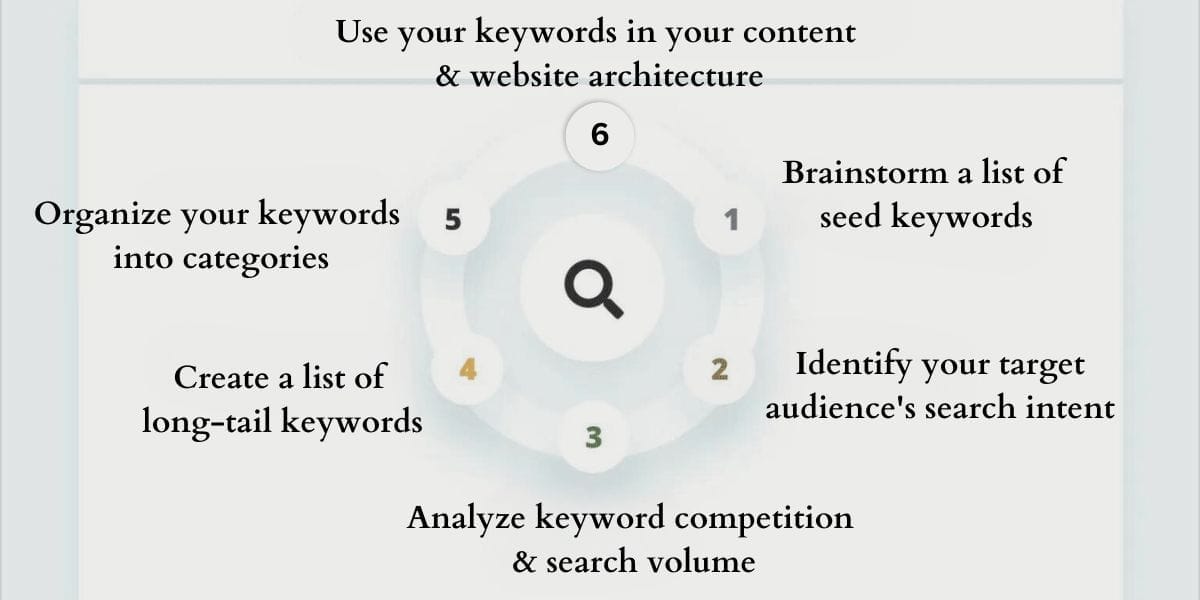
Now that you understand the significance of SEO, the next step is conducting effective keyword research. Identifying relevant keywords can feel like finding treasure, and trust me, that treasure is essential for driving the right traffic to your site. Keywords are the phrases your target audience uses when searching online. Think of it as tuning into a radio station—if your frequency matches theirs, you’ll connect with them.
- Brainstorming Ideas : Start by jotting down terms related to your business.
- Audience Insight : What questions do you think your customers might ask? Use tools like customer surveys or social media polls to gather insights.
- Google Autocomplete : Type a relevant term into Google and see what suggestions pop up. It’s like Google is giving you hints!
Utilizing Keyword Research Tools
Once you’ve brainstormed potential keywords, the next step is to leverage keyword research tools to refine your list. These tools help assess the popularity and competitiveness of keywords, providing you with valuable data.
Here are some popular tools to consider:
- Google Keyword Planner : Great for finding search volume and competition information.
- SEMrush : A comprehensive tool that offers insights into competitor keywords and potential gaps.
- Ubersuggest : This user-friendly tool provides keyword suggestions along with SEO difficulty scores.
I remember starting with just basic keywords, and as I invested time in these tools, my understanding deepened. Discovering long-tail keywords like “affordable SEO services in the USA” opened avenues for targeted audiences, resulting in quality traffic. By fine-tuning your keyword strategy, you’re well on your way to seeing remarkable growth in your website rankings!

Optimizing On-Page SEO
Creating High-Quality Content
With a robust keyword strategy in place, it’s time to focus on optimizing your on-page SEO, starting with high-quality content. Great content is the heart of any successful website. It’s what keeps visitors engaged and encourages them to return. Think of your website as a coffee shop; if you serve great coffee (content), customers will keep coming back for more.
To create content that resonates, consider the following:
- Value and Relevance : Ensure your content addresses your audience’s needs and questions. Ask yourself, “What do my readers want to learn?”
- Engaging Format : Use bullet points, tables, and visuals to break up large chunks of text and maintain reader interest. No one wants to wade through a wall of words!
- Use of Keywords : Incorporate relevant keywords naturally within your content but avoid keyword stuffing, as it can backfire.
A little personal story here: When I started focusing on informative blog posts loaded with valuable insights, my website’s bounce rate sharply declined, and I saw an increase in user engagement—proof that good content pays off!
Implementing Meta Tags and Descriptions
Now that you have high-quality content, let’s not forget about meta tags and descriptions, as these play a crucial role in SEO, too. Think of them as your website’s business card in search results. Here’s how you can optimize them effectively:
- Title Tags : They should be compelling and include your target keywords. Aim for around 60 characters to ensure readability on search engines.
- Meta Descriptions : These offer a brief overview of your page’s content. Keep them under 160 characters and make them engaging. A well-crafted meta description can significantly increase your click-through rate!
By optimizing your on-page elements like content and meta tags, you’re setting up your website for higher visibility and better user engagement. So go ahead, make that content shine!
Enhancing Technical SEO
Improving Website Speed
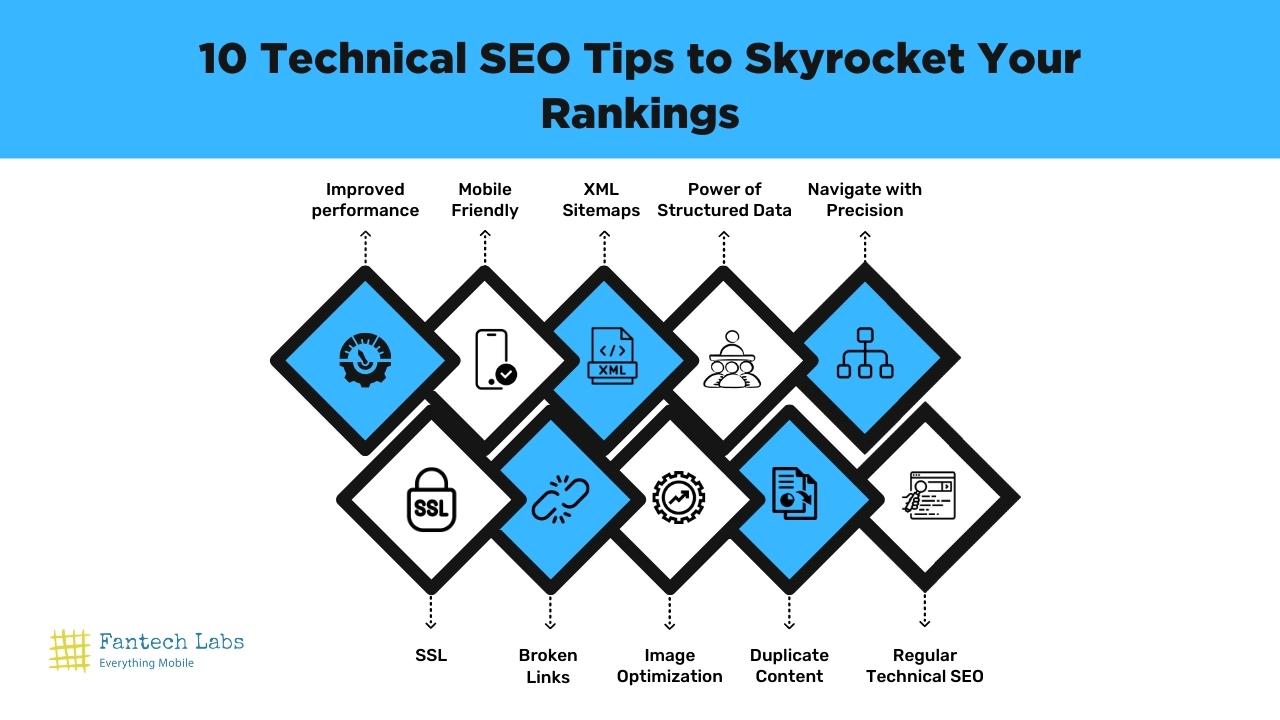
After mastering on-page SEO, the next crucial step is enhancing your technical SEO, which ensures that your website operates smoothly. One of the biggest factors in user experience is website speed. Think about it: in today’s fast-paced world, if a website doesn’t load within a few seconds, most users will abandon it faster than you can say “load time.”
Here are some tips to help improve your website’s speed:
- Optimize Images : Large images can drastically slow down a site. Use formats like JPG or WebP, and compress images without losing quality.
- Minimize HTTP Requests : Combine CSS and JavaScript files to reduce the number of files the server has to load.
- Leverage Browser Caching : Allow frequently accessed resources to be stored locally on users’ devices, speeding up future visits.
I once revamped my site’s speed by applying these techniques, and to my surprise, my bounce rate decreased significantly. It’s all about creating a seamless experience for your visitors!
Optimizing for Mobile Responsiveness
Along with speed, optimizing for mobile responsiveness is critical. With more people browsing on their smartphones, Google prioritizes mobile-friendly sites. If your site isn’t responsive, you’re risking a huge chunk of potential visitors.
Consider implementing these strategies:
- Responsive Design : Use a design that adapts to various screen sizes. Frameworks like Bootstrap can be incredibly helpful here.
- Touchscreen Optimization : Ensure buttons and links are easily clickable on mobile devices. If users have to squint or struggle, they will move on quickly.
- Test Functionality : Regularly check your website on multiple devices and screen sizes to ensure everything looks and operates as intended.
Remember, it’s about putting your best foot forward! By enhancing your website speed and ensuring mobile responsiveness, you’re not just improving technical aspects but also elevating user experience, which ultimately translates into better SEO performance.

Building Quality Backlinks
Importance of Backlinks for SEO
As we continue our journey in enhancing your website’s search engine prowess, let’s talk about an essential element: backlinks. These are links from other websites that point back to yours, and they play a vital role in SEO. Imagine backlinks as votes of confidence; the more quality votes your site receives, the more credible and authoritative it appears to search engines.
Here’s why backlinks are crucial:
- Improved Search Rankings : Quality backlinks signal to search engines that your content is valuable, which can elevate your site’s ranking.
- Increased Referral Traffic : A link from a high-traffic site can bring new visitors to your site directly.
- Enhanced Credibility : Being associated with reputable websites boosts your own credibility and authority within your niche.
I once experienced a surge in traffic after earning backlinks from industry-leading websites, which reinforced my site’s trustworthiness. It’s all about creating authentic relationships!
Strategies for Earning Natural Backlinks
So how do you go about earning these valuable backlinks? Here are some tried-and-true strategies:
- Create Shareable Content : Infographics, how-to guides, and comprehensive research reports often get shared, leading to natural backlinks.
- Guest Blogging : Writing articles for other reputable blogs not only exposes you to a new audience but can also earn you valuable backlinks.
- Leverage Social Media : Share your content across platforms. Engaging with users can often lead to others linking to your content.
- Build Relationships : Connect with influencers and bloggers in your niche. Collaborating or even simply engaging with their content can lead to link opportunities.
By focusing on building quality backlinks, you’re not just improving your SEO metrics; you’re fostering meaningful relationships that can lead to long-term success and visibility for your website. Keep the conversation going, and watch your domain authority rise!

Utilizing Local SEO Techniques
Creating Google My Business Profile
With a solid foundation of backlinks and technical optimizations, let’s pivot to a crucial aspect of SEO that is particularly beneficial for brick-and-mortar businesses: Local SEO. This strategy helps ensure your business stands out in local search results, and the first step is creating a Google My Business (GMB) profile. Think of GMB as your online storefront; it’s the first impression for many potential customers.
To create an effective GMB profile:
- Provide Accurate Information : Include your business name, address, phone number, and hours of operation. Be precise; inconsistency can confuse customers and hurt your rankings.
- Add Photos : Showcase high-quality images of your location, products, or services. Visuals can attract more clicks and engagement.
- Gather Reviews : Encourage happy customers to leave reviews. Responding to them—both positive and negative—can build trust and credibility.
When I set up a GMB profile for my own small business, I saw a noticeable increase in foot traffic and inquiries within weeks. It’s a game-changer!
Optimizing for Local Keywords
In addition to a well-crafted GMB profile, optimizing for local keywords is essential. These keywords help search engines connect local searchers to your business.
To optimize for local keywords:
- Conduct Keyword Research : Use tools like Google Keyword Planner to discover local terms—think phrases like “best coffee shop near me” or “affordable plumbing services in [your city].”
- Incorporate Local Keywords : Include these keywords naturally in your website’s headings, content, and meta tags. Just remember to avoid keyword stuffing!
- Create Location-Based Content : Consider writing blog posts that highlight local events, partnerships, or community involvement. This not only boosts your relevance but also attracts local traffic.
Implementing these local SEO techniques will help your business become a beacon in the community. By ensuring that local customers easily discover you, you’ll not only drive more traffic but also foster meaningful community connections. Dive into the local scene and watch your presence grow!
Harnessing the Power of Social Media
Integrating Social Share Buttons
Having optimized your local SEO, let’s delve into another powerful tool for boosting your online presence: social media. In our interconnected digital world, social media is a tremendous asset for sharing content and engaging potential customers. The first step in leveraging this platform is integrating social share buttons on your website. These small but mighty icons allow visitors to share your content easily, expanding its reach.
Here are some key benefits of adding social share buttons:
- Increase Visibility : Each share can expose your content to new audiences, driving traffic back to your site.
- Encourage Engagement : When followers share your content, it adds a layer of credibility and encourages more engagement.
- Easy Access : Make it simple for visitors to share your content with one click. Choose buttons that are easily visible and widely recognized.
When I added social share buttons to my blog, I noticed an uptick in shares, which ultimately led to increased traffic—but more importantly, it heightened the community’s interaction with my content.
Engaging with Followers for SEO Benefits
Beyond just sharing, actively engaging with your followers is essential for maximizing SEO benefits through social media. When you engage, it’s not just about promotion; it’s about building relationships and fostering a loyal community.
Consider these strategies for effective engagement:
- Respond to Comments : Always acknowledge comments and messages. This fosters a sense of community and shows that you value your audience’s opinions.
- Share User-Generated Content : Encourage followers to share their experiences with your brand. Highlighting their content can create goodwill and more organic engagement.
- Ask Questions : Post questions to generate discussion. This can provide insights into your audience’s preferences while driving engagement.
By harnessing social media effectively—through integration and engagement—you are not only enhancing your brand visibility but also building a supportive community that can lead to improved SEO outcomes. The power of social interaction can be a game-changer in your digital marketing strategy, so dive in and start connecting!
Monitoring and Analyzing SEO Performance
Tracking Keyword Rankings
With an effective social media strategy in place, it’s essential to take a step back and evaluate the impact of all your hard work. Monitoring and analyzing your SEO performance is vital to understand what’s working and what might need adjustments. The first aspect to focus on is tracking keyword rankings. Keeping tabs on how your keywords are performing in search results provides insights into your website’s visibility and effectiveness.
Here are a few methods to track keyword rankings:
- Use SEO Tools : Platforms like SEMrush or Ahrefs offer comprehensive keyword tracking features, giving you updates on where you rank for your target keywords.
- Regular Reporting : Create a schedule (weekly or monthly) for checking your rankings and compile this data into reports for easy reference.
- Monitor Competitors : Pay attention to where competitors rank for similar keywords, which can help you spot new opportunities.
When I first tracked my keyword performance, I was surprised to discover some unexpected terms driving traffic to my site. It was a great reminder of the importance of continual monitoring!
Analyzing Website Traffic and Conversions
The next step in your performance analysis is looking closely at website traffic and conversions. While tracking keyword rankings tells you how your site is being found, analyzing traffic reveals how users interact with your content.
Consider these strategies for effective analysis:
- Google Analytics : This free tool remains a staple for tracking user behavior. Analyze metrics such as bounce rate, session duration, and pages per session to gauge content performance.
- Conversion Tracking : Set up goals in Google Analytics to track actions you want visitors to take, such as signing up for a newsletter or making a purchase.
- Identify Traffic Sources : Understanding where your traffic comes from (organic search, social media, referrals) can help you pinpoint which strategies are most effective.
In my experience, diving deep into conversion metrics uncovered areas where I could improve user experience. Small tweaks that enhanced navigation led to increased conversions! By consistently monitoring and analyzing both keyword rankings and website performance, you position your business for sustained growth and success in an ever-evolving digital landscape.

Implementing Schema Markup
Understanding the Benefits of Schema
With a solid grasp of your SEO performance metrics, it’s time to enhance your website’s visibility further by implementing schema markup. You might be wondering, “What exactly is schema markup?” In simple terms, it’s a type of structured data that helps search engines understand your content more effectively. Think of it as the GPS for search engines, guiding them to the key information on your site.
Here are some benefits of using schema markup:
- Enhanced SERP Appearance : Schema can lead to rich snippets—those eye-catching results that include images, star ratings, or additional information—which significantly increase click-through rates.
- Improved Search Visibility : By helping search engines gain clarity on your content, schema markup can improve your chances of ranking higher in search results.
- Better Targeting : Schema allows you to highlight specific details, such as events, products, or services, making it easier for the right audience to find your site.
When I implemented schema markup on my website, I noticed that not only did my search appearance improve, but user engagement also skyrocketed thanks to more informative snippets!
Adding Schema Markup to Website
Now that you understand the benefits, let’s dive into how to add schema markup to your website. Fortunately, it’s not as complicated as it may sound!
- Choose the Right Schema Type : Start by identifying which schema type fits your content. The Schema.org website offers a wide array of types—whether it’s for articles, recipes, or business information.
- Use Schema Markup Generators : Tools like Google’s Structured Data Markup Helper or other online generators can simplify the process of creating the necessary code. Simply input your information, and they will generate the markup for you.
- Add the Markup to Your Website : Implement this markup into the HTML of your web pages. If you’re using a CMS like WordPress, consider plugins that make adding schema easy.
- Test Your Markup : After adding schema markup, always use Google’s Rich Results Test or Schema Markup Validator to ensure everything is functioning correctly.
In my journey of adding schema markup, these steps made the process straightforward and surprisingly rewarding. By implementing schema markup effectively, you not only enhance search engine understanding but also create a more engaging experience for your visitors. It’s an easy win within the vast realm of SEO!

Optimizing for Voice Search
Importance of Voice Search for SEO
As we wrap up our deep dive into SEO strategies, let’s not overlook the rising importance of voice search in today’s digital landscape. With the rise of smart speakers and voice-activated assistants like Siri, Alexa, and Google Assistant, more people are using voice commands to find information. This shift means optimizing your website for voice search has become an essential part of your SEO strategy.
Here are a few reasons why voice search matters:
- Rising Popularity : Recent studies indicate that more than 50% of all searches will be voice-based by 2025. It’s a trend that’s only going to grow!
- Conversational Language : Voice searches tend to be longer and more like a natural conversation, which means your content needs to reflect that style to match user intent.
- Local Search Boost : Voice queries often have a local intent since users frequently seek immediate answers, such as “restaurants near me.” If optimized correctly, your business can capture this local traffic.
I first realized the power of voice search when I optimized my site for it, leading to increased local inquiries for my services!
Tailoring Content for Voice Search Queries
Now, how can you effectively tailor your content for voice search? Here are some actionable steps:
- Focus on Natural Language : Write your content in a conversational tone, using simpler phrases and questions that people might ask. For example, instead of “best pizza shop,” consider “What’s the best pizza shop in my area?”
- Use Structured Data : Implement schema markup to help search engines better understand your content. This enhancement aids in delivering accurate answers for voice searches.
- Create FAQ Pages : Anticipate common questions relating to your niche and create FAQ style content that delivers concise answers. This format aligns perfectly with the type of queries users typically voice.
- Optimize for Local SEO : Ensure your Google My Business profile is complete and updated since many voice searches are localized.
When I shifted my content strategy to cater to voice search, I was amazed at how quickly my engagement metrics improved. By optimizing for voice search, you position your content to meet the ever-evolving needs of users today. Embrace this trend, and you’ll not only keep up but flourish in an increasingly voice-activated world!